Website malware is a growing threat that can compromise your online presence, steal sensitive information, and damage your reputation. To protect your website from malware, it’s important to regularly check and scan for malicious code and files. In this tutorial, we’ll show the 10 best proven methods for scanning websites for malware removal.

Use an online scanning tool to detect and remove WordPress website malware

Online scanning tools are a convenient and effective way to scan websites for malware. Popular online tools include VirusTotal, Sucuri, SiteCheck, and Google Safe Browsing. How to scan a website online Let’s learn through a tutorial:

1. VirusTotal

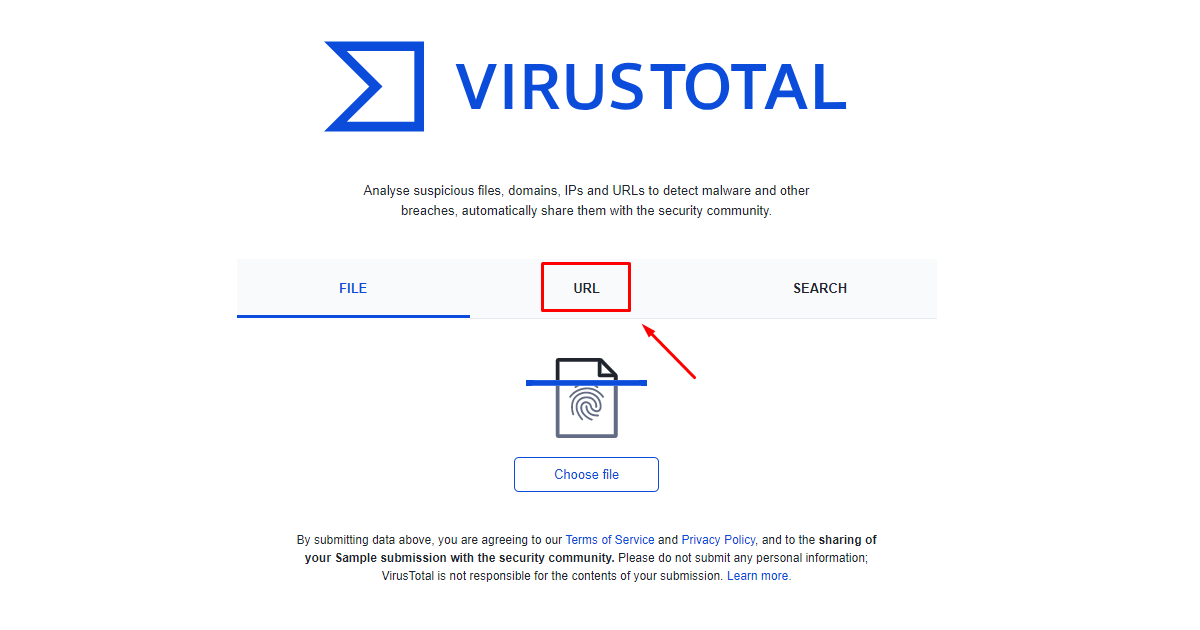
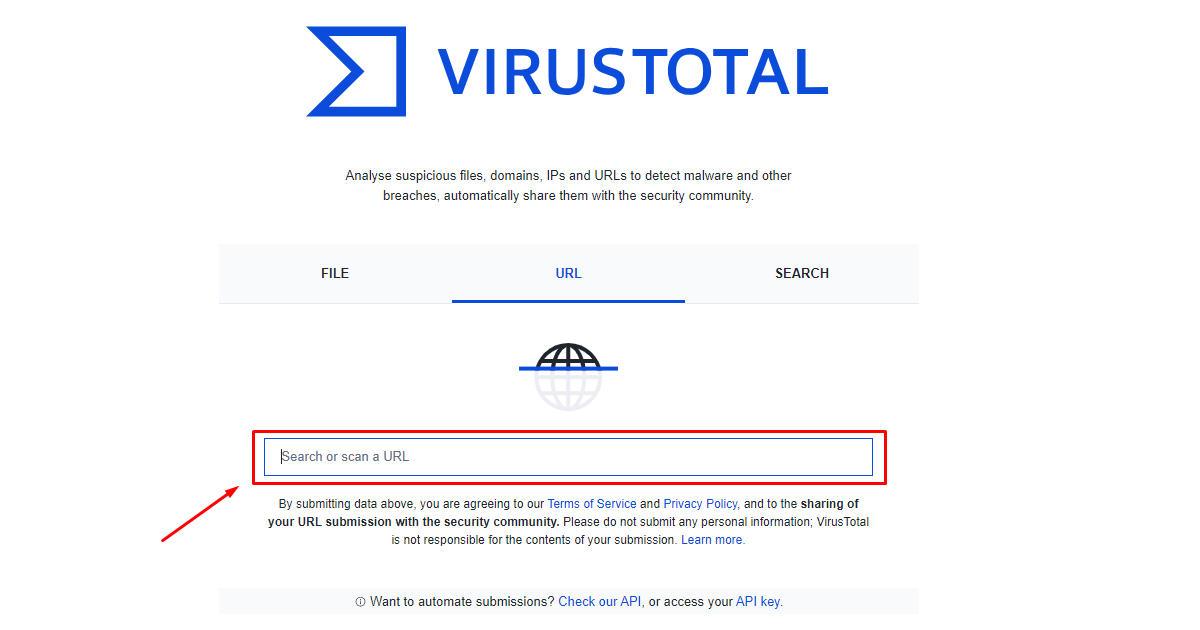
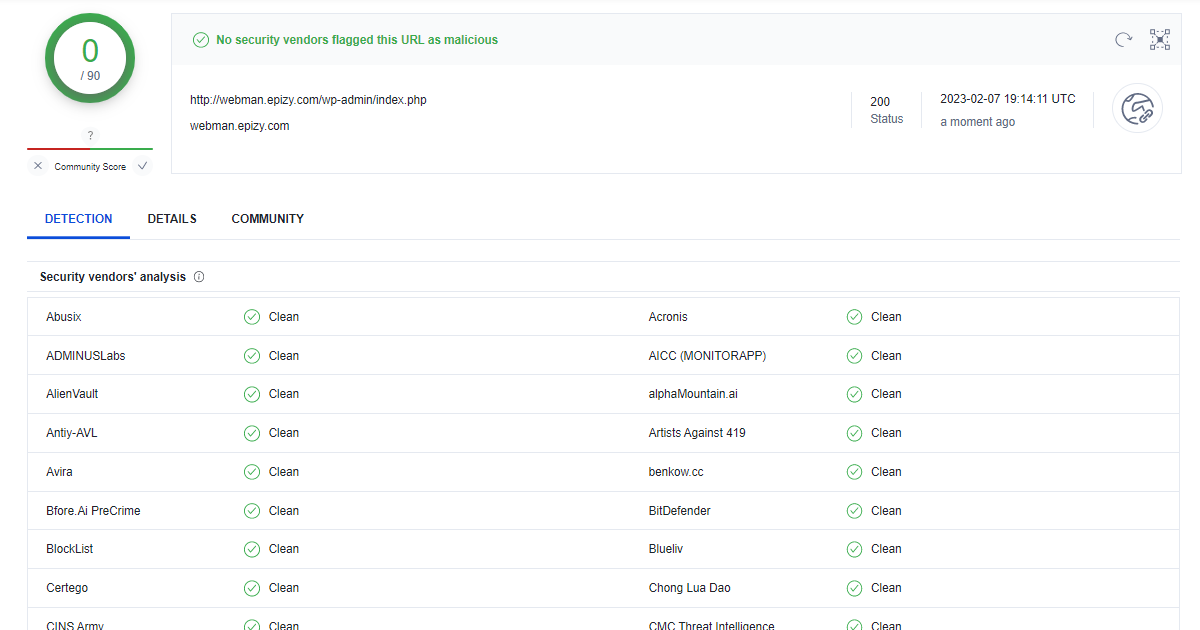
Visit VirusTotal site and click on URL online scanning tool website for WordPress malware detectionInput your website URL  and press enter. input your website for WordPress malware detectionIt may few minutes to scan. If there is a virus on your website then it will be caught, Otherwise everything will look clean. malware search result for WordPress malware protection
2. Google Transparency Report

One of the best ways to scan a website for malware is Google Transparency Report. Through this, you can find malware on your site very easily: lets see

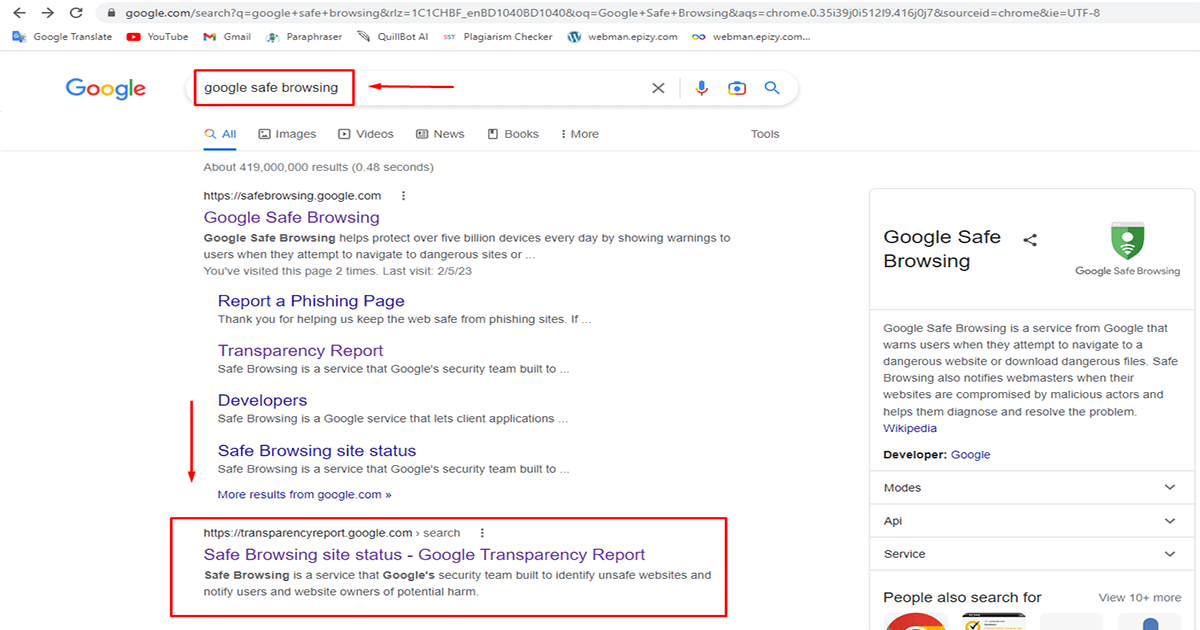
First, Go to your google search engine and search “google safe browsing”. You will see the link “https://transparencyreport.google.com” below.Go to the link

Search for Google Safe Browsing in the Google search engine for WordPress malware protection

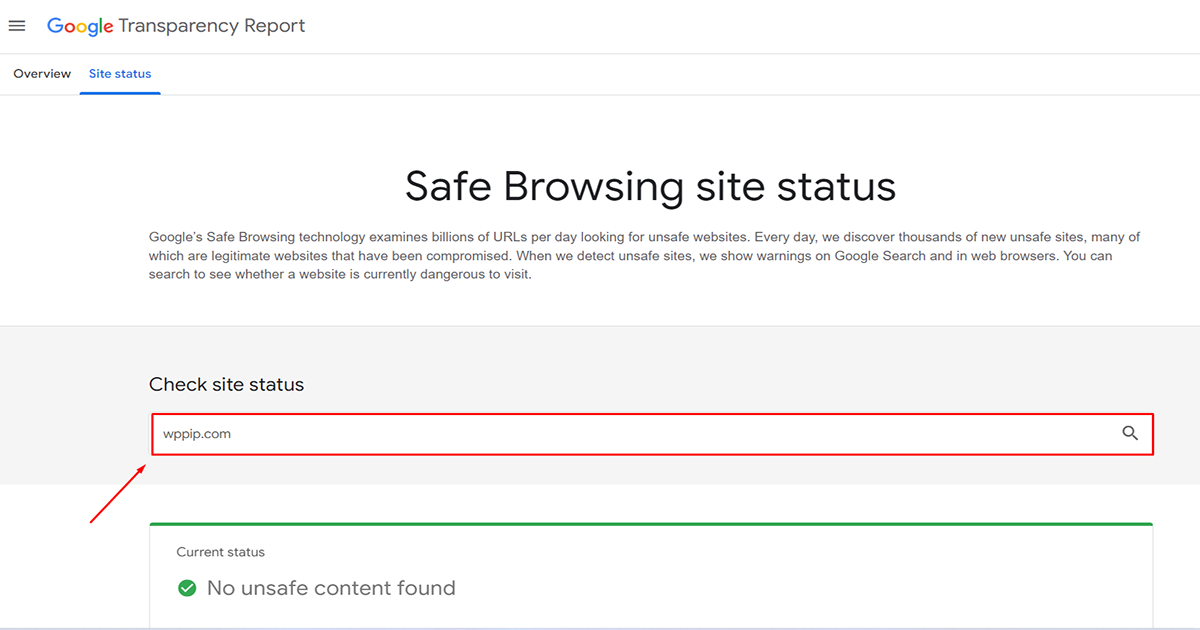
Type your website into the “Check site status” search bar and press enter. after that, you get the resultMalware scan results at google transparency for WordPress malware protection

3. Isitwp

Isitwp is another popular online malware scanner. Malware can be detected very easily through this. Lets see:

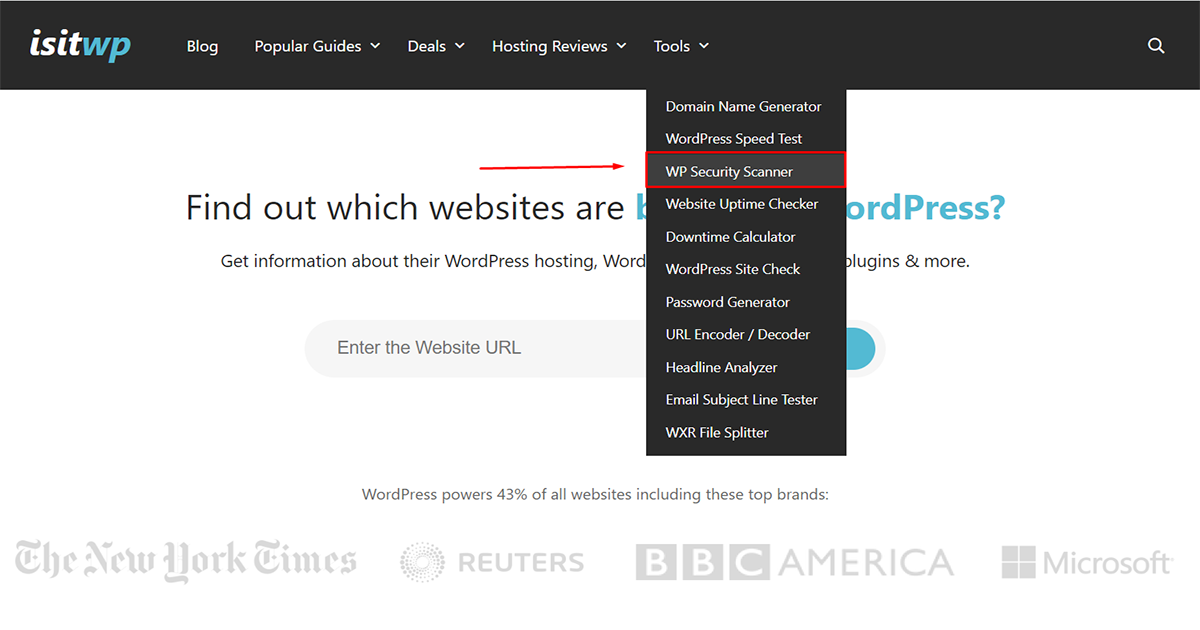
First , visit to islitwp website and go to Tools > WP Security Scannner

click wp security scanner on isitwp for WordPress malware protection

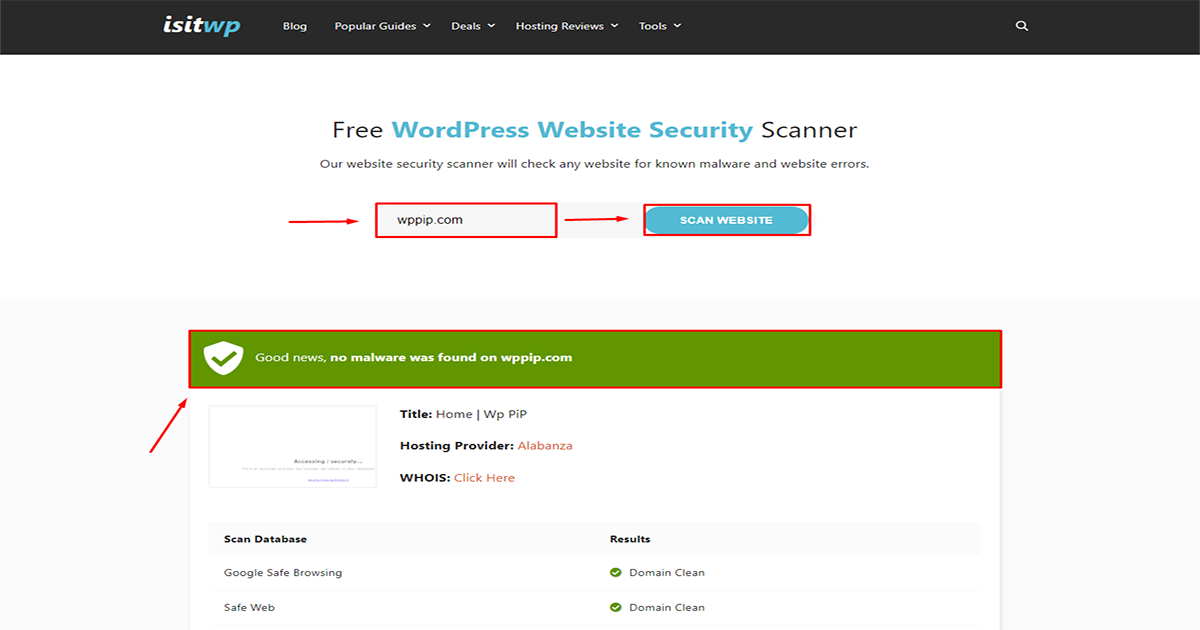
After that type your website into the search bar and click the “scan website”. Now is time to wait…

Malware scan results at isitwp.com for WordPress malware protection

After waiting you will see the result . This website has no malware so it looks clean.

4. wpsec

wpsec is a powerful tool among online malware scanner tools. Through this, malware can be detected easily in a few seconds. Let’s see how to scan your website using wpsec:
First, visit to wpsec.com website and type your website into the search bar and click the “start scan”. Now is time to wait…

 Scan for WordPress Website Malware Removal

After waiting you will see the result .

5. Sucuri

Sucuri is one of the most popular software used for malware scan of the WordPress. There are two ways you can find out if malware is on your website infected or not with Sucuri.
1. Sucuri online site checker
2. Sucuri plugin
Now we have to learn how to find WordPress malware in these two ways

1. Sucuri online site checker:


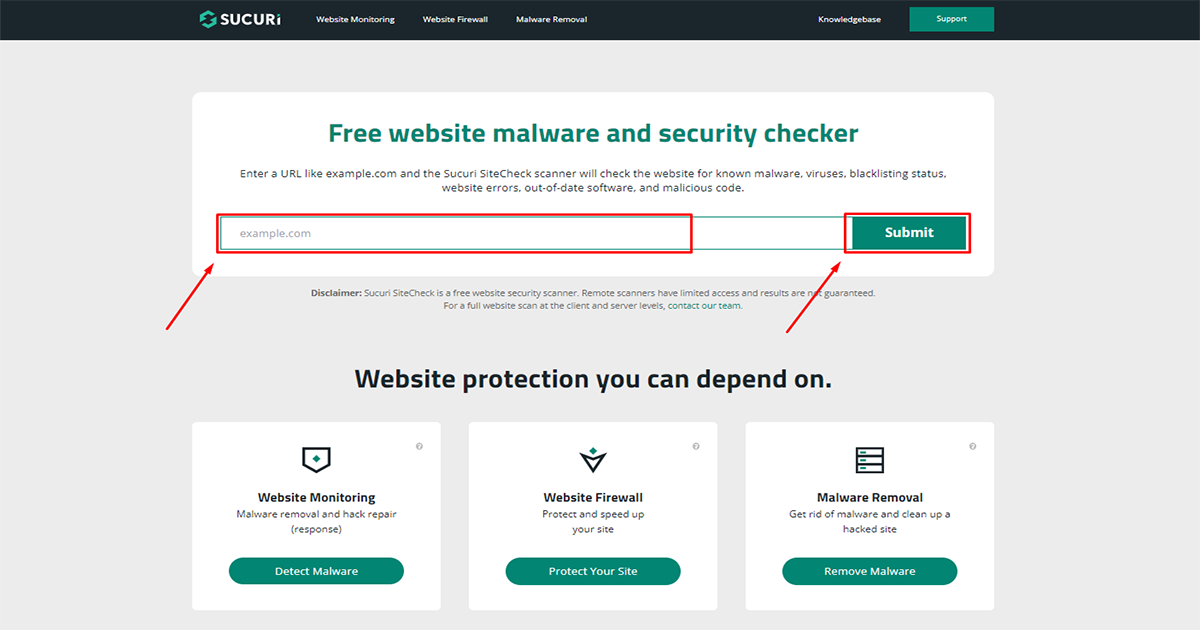
First, Visit to the “https://sitecheck.sucuri.net/” website. Then Paste your website and click to the submit button,

start scan process on sucuri.com website for WordPress malware protection

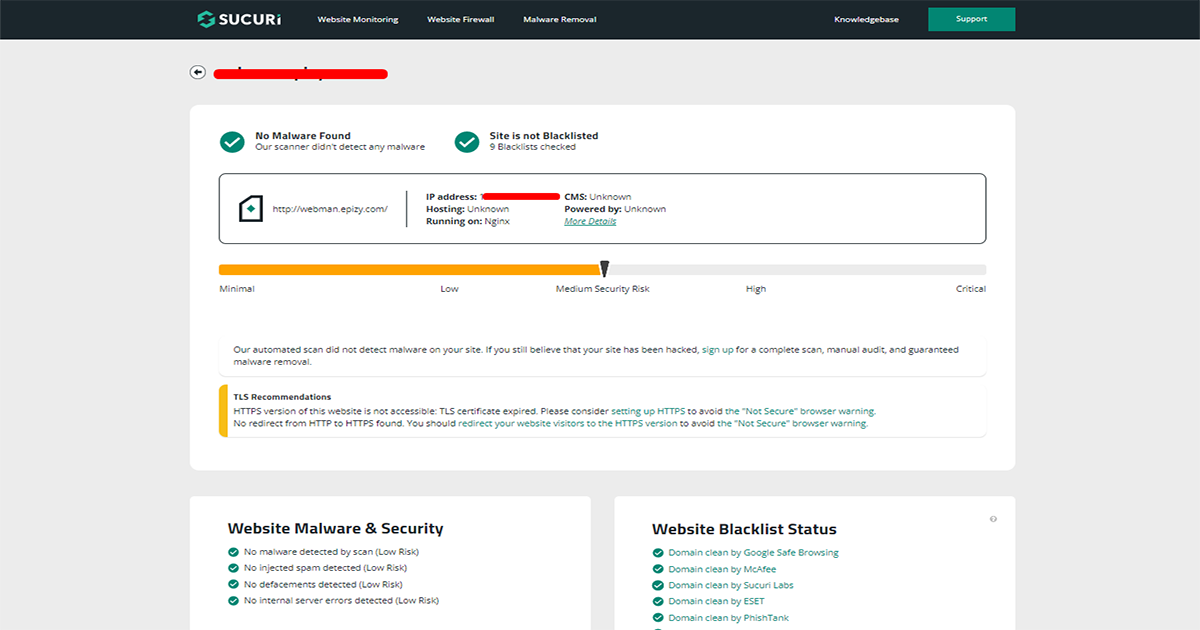
after waiting a moment you can see the result. This website has no malware so it looks clean.

result on securi online scanner for WordPress malware protection

2. Sucuri plugin:


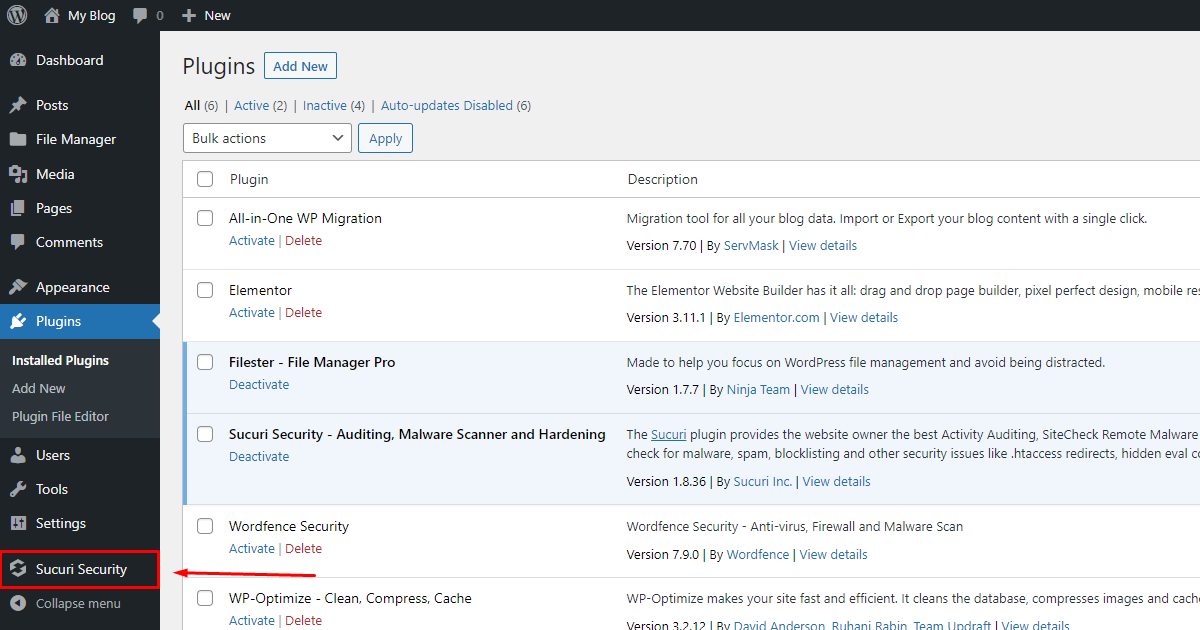
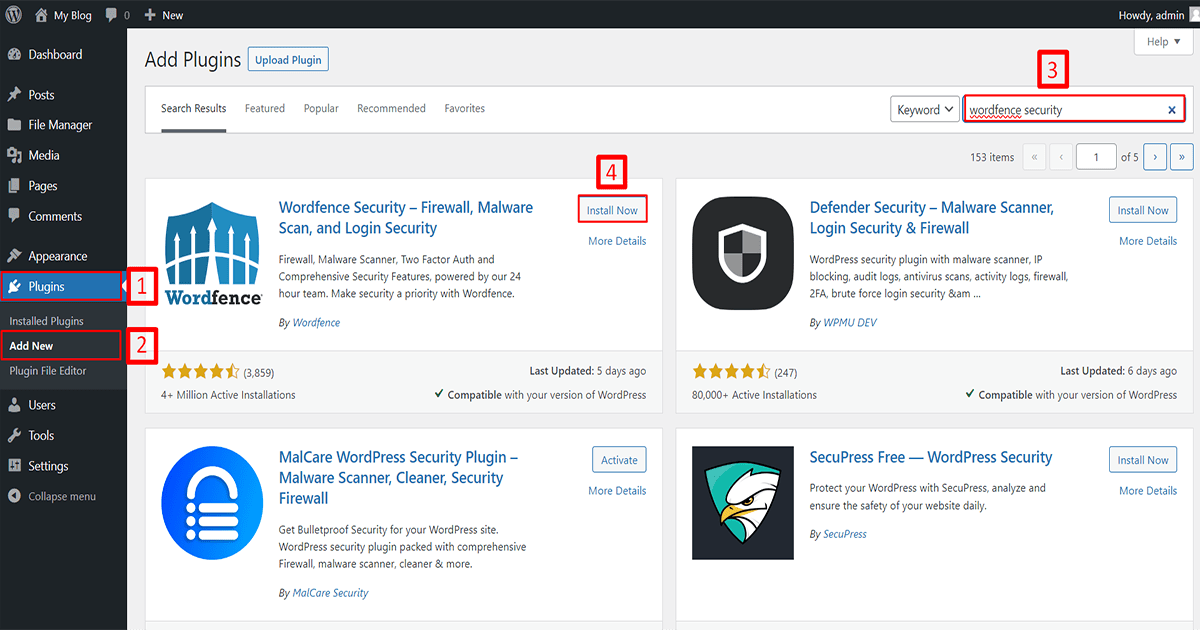
Before finding malware in your WordPress using sucuri plugin. you need to install it. let’s learn how to install sucuri security plugin on your website:
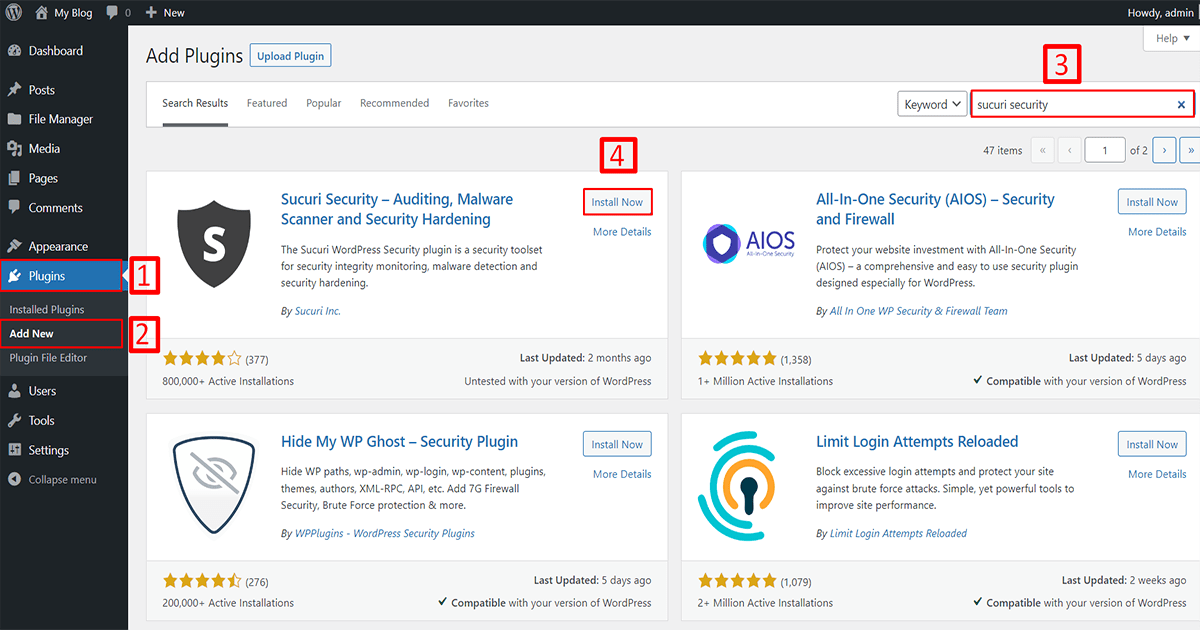
First , Go to your WordPress dashboard and Follow the steps.

installation process on sucuri for WordPress malware protection

1. Go to Plugins
2. Click on Add New
3. Search for the “Sucuri security” plugin,
4. Click on the “Install Now” button and install it.

Then the installation process takes some time so wait a few moments. After that click to activate the plugin. Now the installation process is complete. You can see the plugin below

successful installation securi security on your WordPress for WordPress malware protection

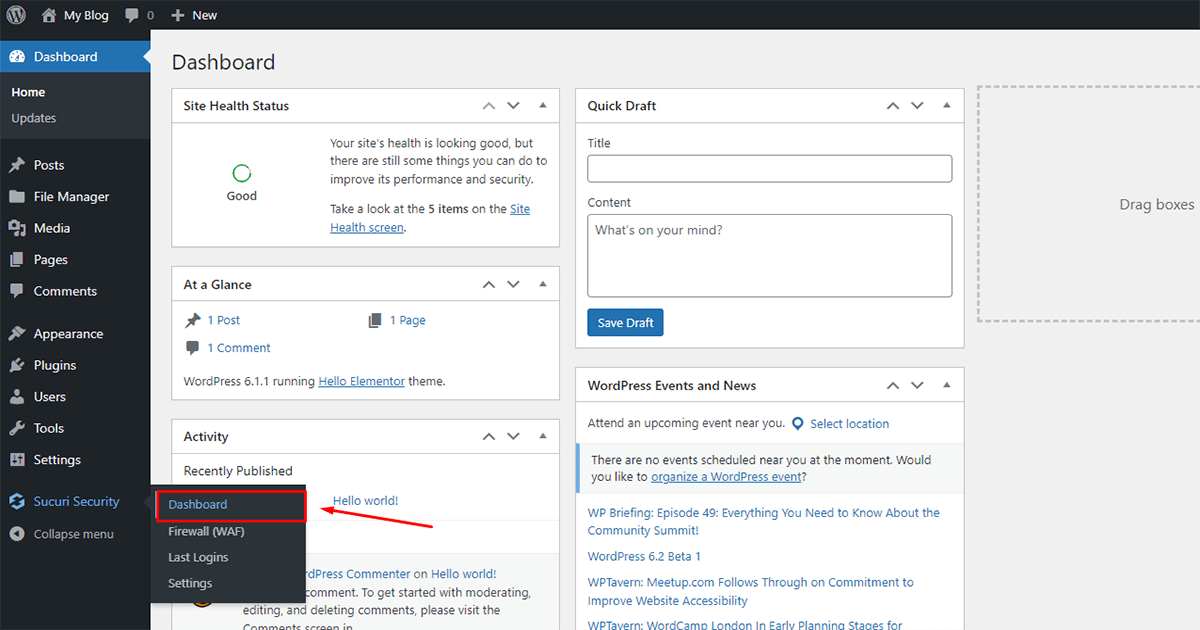
Now go to your sucuri security dashboard

Enter Securi Security dashboard for WordPress malware protection

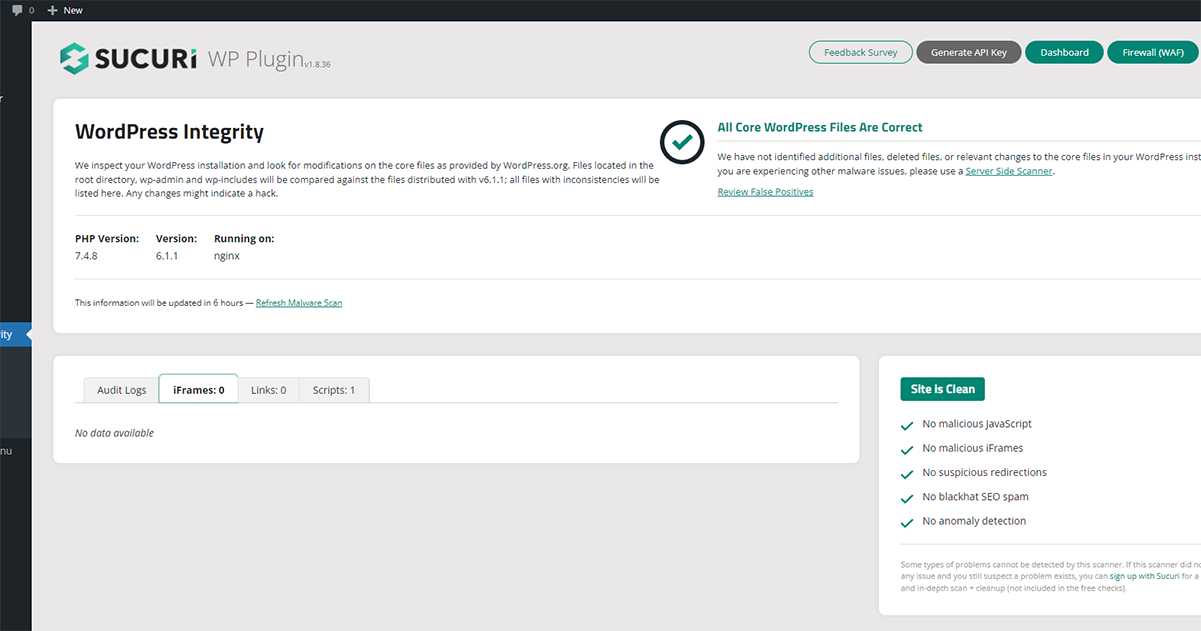
Your sucuri security plugin will automatically scan your website after entering the dashboard and find out if there is any malware on your website. This website has no malware so it looks clean

Malware scan results at sucuri for WordPress malware protection

6. Wordfence

Wordfence is one of the top rated security and malware scanner tools. Through this, we can know if there’s malware on the website. in addition, it finds out malware location, malware type, malware role, etc. Let’s see how to scan with wordfence:
First of all, you need to install it. Go to your wordpress dashboard and Follow the steps

installation process on wordfence for WordPress malware protection

1. Go to Plugins
2. Click on Add New
3. Search for the “Sucuri security” plugin,
4. Click on the “Install Now” button and install it.

Then the installation process takes some time so wait a few moments. After that click to activate the plugin. Now the installation process is complete. if you want to know about this plugin detail to click readme

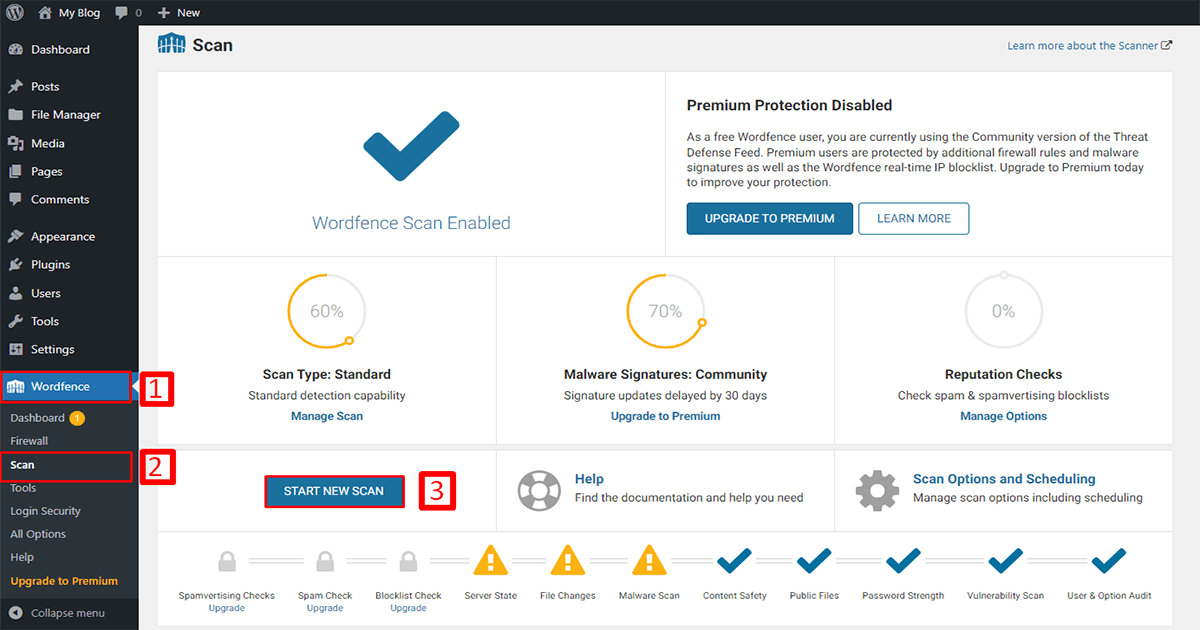
Go to your WordPress Dashboard and Follow the stepsstart scan process on wordfence for WordPress malware protection

  1. Go to Wordfence
  2. Click on scan
  3. Click on the “start new scan” button to start scan.

After waiting for the scan result you will see below.


7. Sitelock

Sitelock is one of the top rated security and online malware scanner tools. It provides more features besides malware scan like SSL scan ,Spam scan,SQL injection scan,Cross-site scripting scans,SiteLock Risk Score etc. Let’s see how to scan with Sitelock:

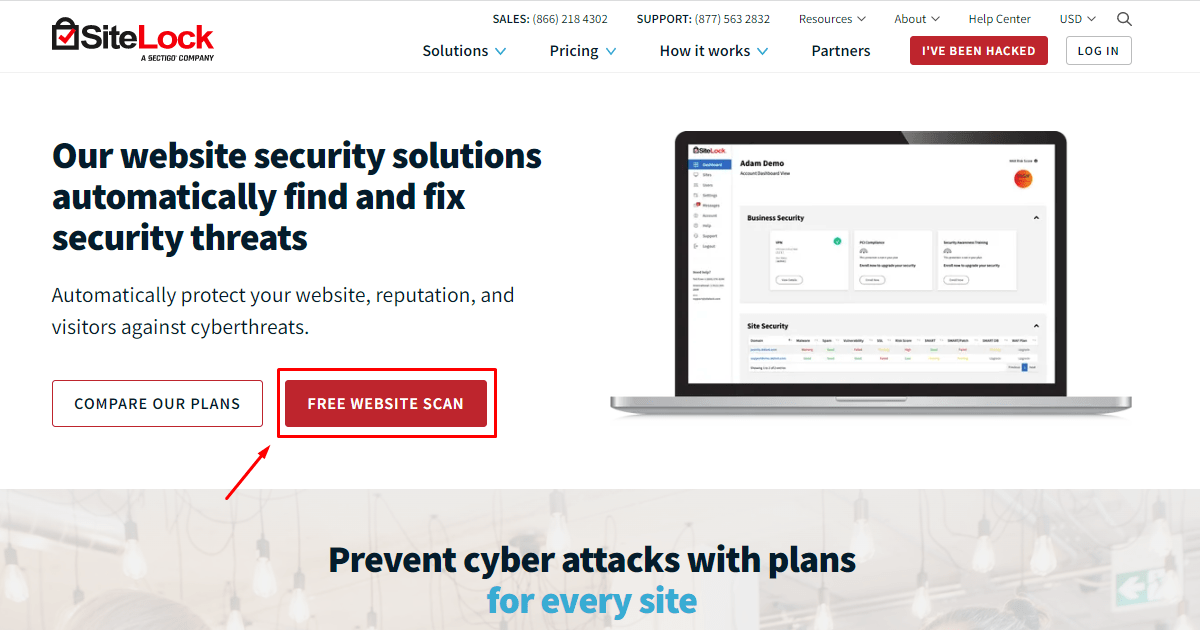
First, visit to Sitelock.com website and click “free website scan” button.

visit the sitelock.com to scan malware for WordPress malware protection

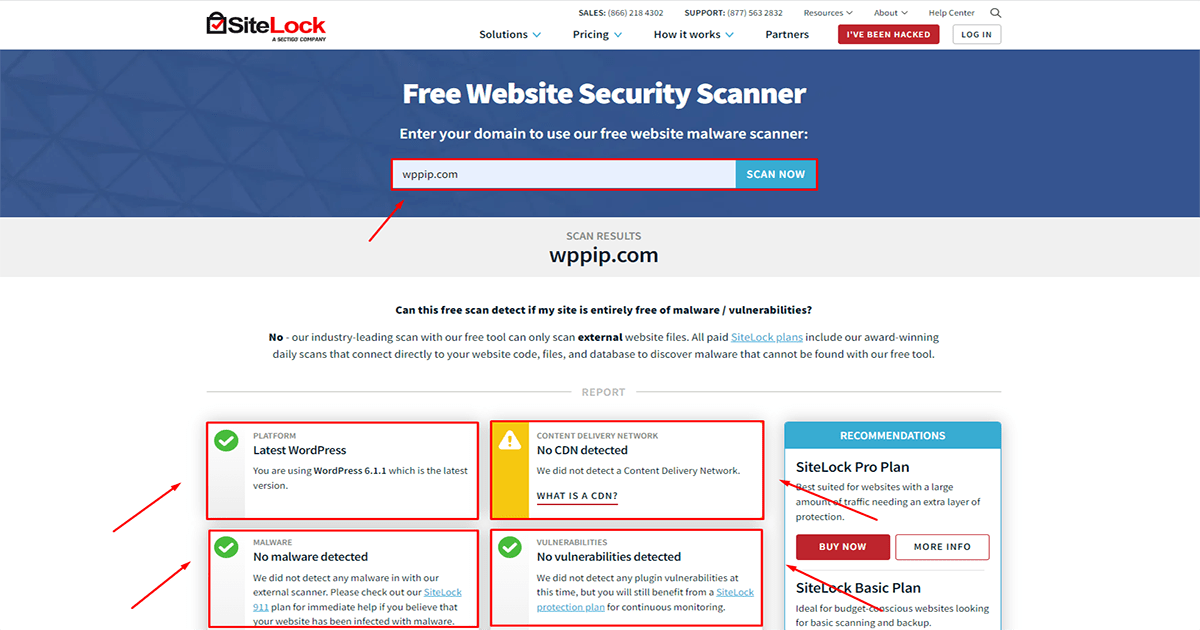
Then type your website into the search bar and click the “Scan Now”. Now is time to wait…

Malware scan results at sitelock.com for WordPress malware protection

After that you will see the result.

8. Siteguarding

Siteguarding is one of the most popular security and online malware scanner tools. It provides more features besides malware scan like Website Protection Service,Website AntivirusWAF (Web Application Firewall),SSL Certificate,Website Backup Services,SEO & Content Protection,Bad Bot & Spam Blocker etc. Let’s see how to scan with Siteguarding:

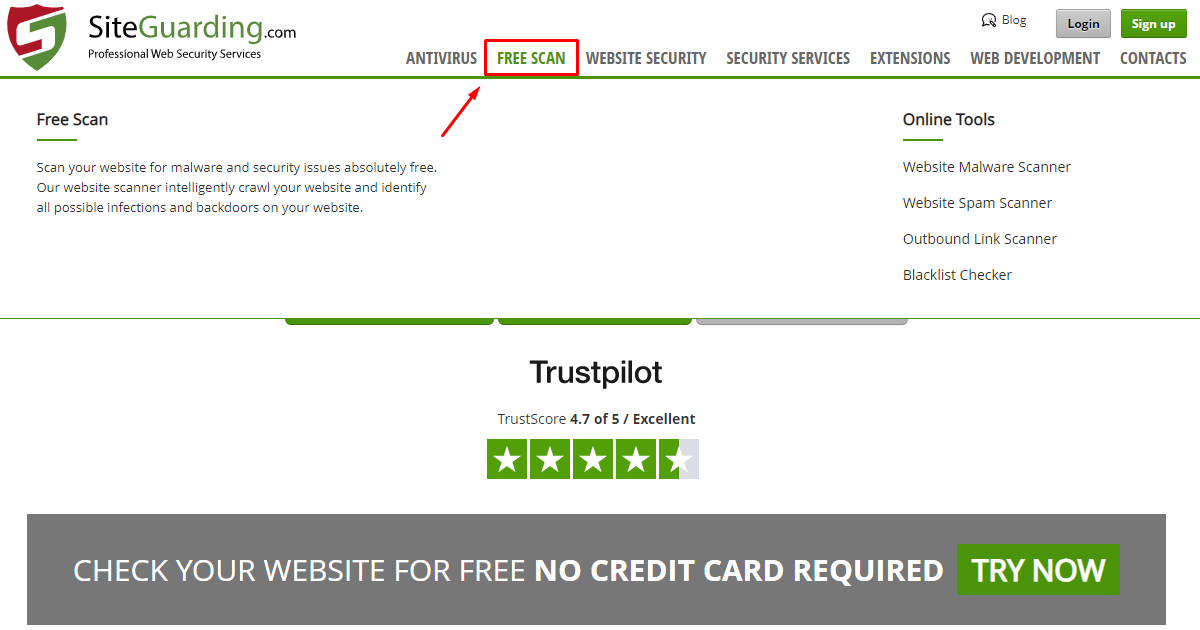
First, visit to siteguarding.com website and click “free scan”

click free scan on siteguarding for WordPress malware protection

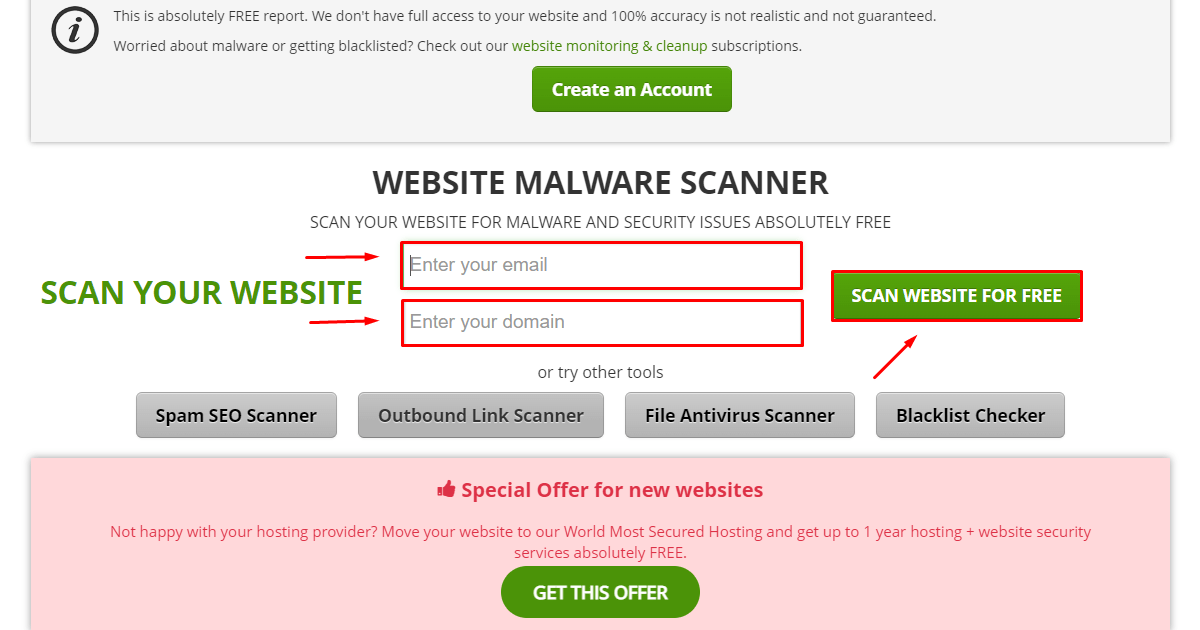
Then type your website and email into the form and click the “Scan website for free”

type your URL and mail on siteguarding for WordPress malware detection

After that, you will see the condition of your website.

9. Malcare

Malcare is one of the most popular security and online malware scanner tools. It also provide more features besides malware scan like Malware Removal,WordPress Firewall,Bot Protection,Vulnerability Scanner,WordPress Backups,Activity Log,Emergency Cleanup etc.

10. wppip

Wppip is an online malware scanner.

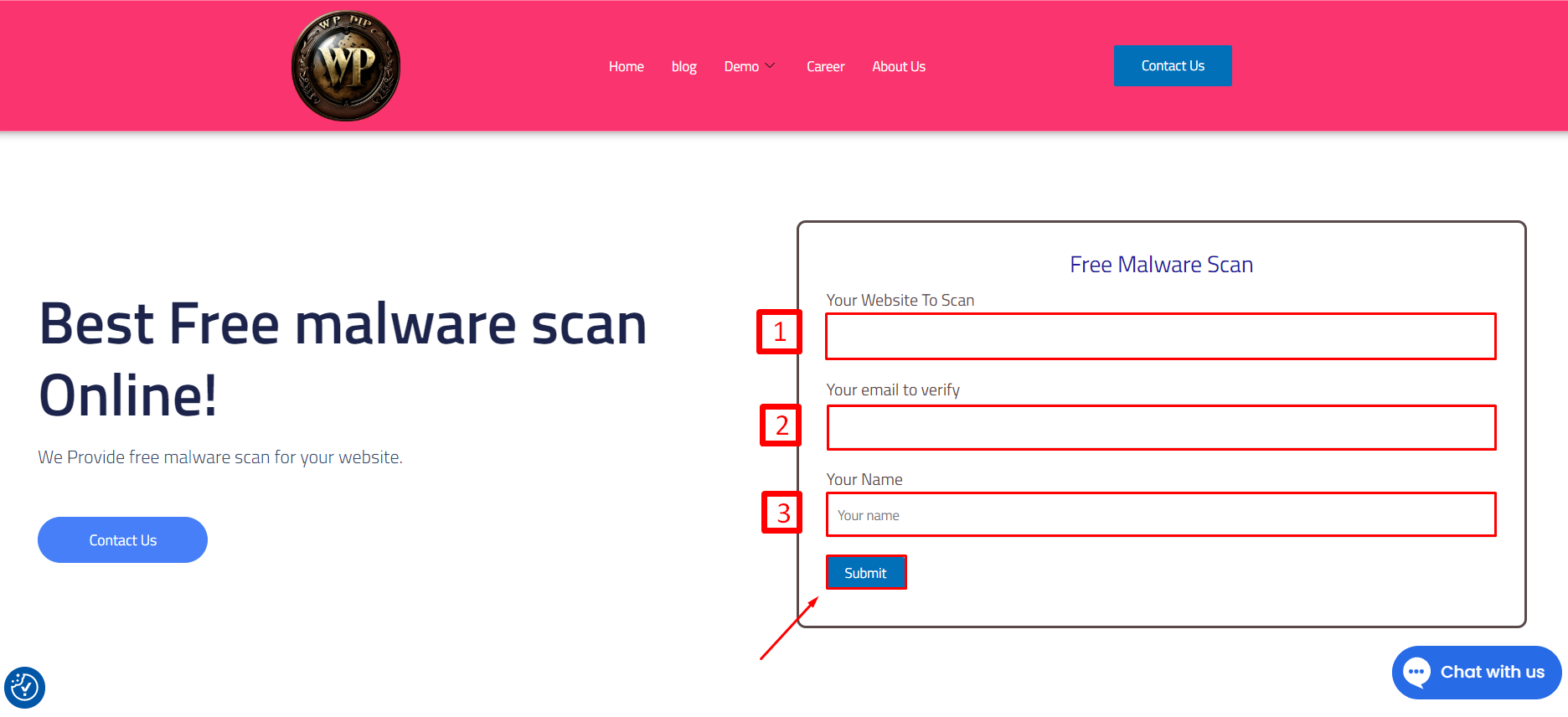
First of all, visit to “https://wppip.com/best-free-malware-scan-online/” website. Submit your website link, email and name. Wppip team will find out your website problems like malware attacks, Brute Force,SSLerrors, and spam problems.

Follow the steps

wppip for WordPress malware protection and malware removal

1 type your website link
2 type your Email address
3 type your Name and click the submit button

Read More

10 Best Ways to Scan for WordPress Website Malware removal

Website malware is a growing threat that can compromise your online presence, steal sensitive information, and damage your reputation. To protect your website from malware, it’s important to regularly check and scan for malicious code and files. In this tutorial, we’ll show the 10 best proven methods for scanning websites for malware removal.

Use an online scanning tool to detect and remove WordPress website malware

Online scanning tools are a convenient and effective way to scan websites for malware. Popular online tools include VirusTotal, Sucuri, SiteCheck, and Google Safe Browsing. How to scan a website online Let’s learn through a tutorial:

1. VirusTotal

Visit VirusTotal site and click on URL online scanning tool website for WordPress malware detectionInput your website URL  and press enter. input your website for WordPress malware detectionIt may few minutes to scan. If there is a virus on your website then it will be caught, Otherwise everything will look clean. malware search result for WordPress malware protection
2. Google Transparency Report

One of the best ways to scan a website for malware is Google Transparency Report. Through this, you can find malware on your site very easily: lets seeFirst, Go to your google search engine and search “google safe browsing”. You will see the link “https://transparencyreport.google.com” below.Go to the linkSearch for Google Safe Browsing in the Google search engine for WordPress malware protectionType your website into the “Check site status” search bar and press enter. after that, you get the resultMalware scan results at google transparency for WordPress malware protection
3. Isitwp

Isitwp is another popular online malware scanner. Malware can be detected very easily through this. Lets see:First , visit to islitwp website and go to Tools > WP Security Scannnerclick wp security scanner on isitwp for WordPress malware protectionAfter that type your website into the search bar and click the “scan website”. Now is time to wait…Malware scan results at isitwp.com for WordPress malware protectionAfter waiting you will see the result . This website has no malware so it looks clean.
4. wpsec

wpsec is a powerful tool among online malware scanner tools. Through this, malware can be detected easily in a few seconds. Let’s see how to scan your website using wpsec: First, visit to wpsec.com website and type your website into the search bar and click the “start scan”. Now is time to wait…start scan process on wpsec.com website for WordPress malware protectionAfter waiting you will see the result .

5. Sucuri

Sucuri is one of the most popular software used for malware scan of the WordPress. There are two ways you can find out if malware is on your website infected or not with Sucuri. 1. Sucuri online site checker 2. Sucuri plugin Now we have to learn how to find WordPress malware in these two ways

1. Sucuri online site checker:

First, Visit to the “https://sitecheck.sucuri.net/” website. Then Paste your website and click to the submit button,start scan process on sucuri.com website for WordPress malware protectionafter waiting a moment you can see the result. This website has no malware so it looks clean.result on securi online scanner for WordPress malware protection

2. Sucuri plugin:

Before finding malware in your WordPress using sucuri plugin. you need to install it. let’s learn how to install sucuri security plugin on your website: First , Go to your WordPress dashboard and Follow the steps.installation process on sucuri for WordPress malware protection1. Go to Plugins 2. Click on Add New 3. Search for the “Sucuri security” plugin, 4. Click on the “Install Now” button and install it.Then the installation process takes some time so wait a few moments. After that click to activate the plugin. Now the installation process is complete. You can see the plugin belowsuccessful installation securi security on your WordPress for WordPress malware protectionNow go to your sucuri security dashboardEnter Securi Security dashboard for WordPress malware protectionYour sucuri security plugin will automatically scan your website after entering the dashboard and find out if there is any malware on your website. This website has no malware so it looks cleanMalware scan results at sucuri for WordPress malware protection

6. Wordfence

Wordfence is one of the top rated security and malware scanner tools. Through this, we can know if there’s malware on the website. in addition, it finds out malware location, malware type, malware role, etc. Let’s see how to scan with wordfence: First of all, you need to install it. Go to your wordpress dashboard and Follow the stepsinstallation process on wordfence for WordPress malware protection1. Go to Plugins 2. Click on Add New 3. Search for the “Sucuri security” plugin, 4. Click on the “Install Now” button and install it.Then the installation process takes some time so wait a few moments. After that click to activate the plugin. Now the installation process is complete. if you want to know about this plugin detail to click readmeGo to your WordPress Dashboard and Follow the stepsstart scan process on wordfence for WordPress malware protection
  1. Go to Wordfence
  2. Click on scan
  3. Click on the “start new scan” button to start scan.
After waiting for the scan result you will see below.

7. Sitelock

Sitelock is one of the top rated security and online malware scanner tools. It provides more features besides malware scan like SSL scan ,Spam scan,SQL injection scan,Cross-site scripting scans,SiteLock Risk Score etc. Let’s see how to scan with Sitelock:First, visit to Sitelock.com website and click “free website scan” button.visit the sitelock.com to scan malware for WordPress malware protectionThen type your website into the search bar and click the “Scan Now”. Now is time to wait…Malware scan results at sitelock.com for WordPress malware protectionAfter that you will see the result.

8. Siteguarding

Siteguarding is one of the most popular security and online malware scanner tools. It provides more features besides malware scan like Website Protection Service,Website AntivirusWAF (Web Application Firewall),SSL Certificate,Website Backup Services,SEO & Content Protection,Bad Bot & Spam Blocker etc. Let’s see how to scan with Siteguarding:First, visit to siteguarding.com website and click “free scan”click free scan on siteguarding for WordPress malware protectionThen type your website and email into the form and click the “Scan website for free”type your URL and mail on siteguarding for WordPress malware detectionAfter that, you will see the condition of your website.

9. Malcare

Malcare is one of the most popular security and online malware scanner tools. It also provide more features besides malware scan like Malware Removal,WordPress Firewall,Bot Protection,Vulnerability Scanner,WordPress Backups,Activity Log,Emergency Cleanup etc.

10. wppip

Wppip is an online malware scanner.First of all, visit to “Free malware scan online” website. Submit your website link, email and name. Wppip team will find out your website problems like malware attacks, Brute Force,SSLerrors, and spam problems.Follow the stepswppip for WordPress malware protection and malware removal1 type your website link 2 type your Email address 3 type your Name and click the submit button

Read More

10 Best Ways to Scan for WordPress Website Malware removal

10 Best Ways to Scan for WordPress Website Malware removal…

Ensuring your WordPress site remains secure and free from malware is not just about initial set-up and ad-hoc checks. It requires a strategic, ongoing approach to protect your online space effectively. A website infected with malware can lead to a myriad of issues, from slow loading times and compromised data to even being blacklisted by search engines. Therefore, staying proactive in identifying and eliminating potential security threats before they manifest is imperative.

In addition to the preventative measures that you can and should employ, the regular scanning of your WordPress website is equally crucial. It’s essential to establish a schedule for scanning that factors in the frequency of updates and changes made to your site. Several tools are designed to help you comprehensively scan your website for any signs of malware, allowing you to pinpoint and resolve issues before they escalate. The process of “Scan for WordPress Website Malware Removal” involves using both automated tools and manual checks to ensure nothing slips through the cracks.

One of the most efficient tools on the market is Wordfence, known for its depth in scanning abilities, ensuring that no corner of your site is left unchecked. It automatically scans your website files, themes, and plugins, identifying malicious code and providing you with detailed reports. Not only does it help you remove malware, but it also gives insights into vulnerabilities, assisting you in taking preemptive actions. The importance of regularly using such tools cannot be overstated; they form a first line of defense in your “Scan for WordPress Website Malware Removal” strategy.

Another valuable tool is Sucuri SiteCheck, which performs front-end, server-side, and database scans. This thorough approach ensures that malware not only gets detected but is removed timely. Sucuri provides an easy-to-understand security report and offers clean-up services if needed. Regular usage ensures your site remains healthy and secure, contributing to peace of mind and solid security credibility. By integrating tools like Sucuri into your routine, you’re making strides in fortifying your site’s security framework.

It’s also worth exploring MalCare, a lesser-known gem in the world of WordPress security. MalCare stands out due to its intelligent firewall and automatic daily scans. It checks WordPress core files, plugins, and other components for anomalies that could indicate a malware infestation. Its cloud-based scanning ensures that the tool doesn’t slow down your website while its deep scanning capabilities root out even the most stubborn malware infections. By making MalCare a part of your toolkit, you’re optimizing your efforts for the “Scan for WordPress Website Malware Removal.”

Moreover, consider implementing backup solutions so that in the event malware does penetrate your defenses, you have a fallback option that doesn’t involve starting from scratch. Plugins like UpdraftPlus and BackupBuddy automate the backup process, ensuring your data is encrypted and can be restored promptly. This layer of redundancy can prove invaluable, minimizing downtime and data loss, thus

WhatsApp Logo Chat with Us