
Table of Contents
ToggleHow to install Free Sucuri Security Plugin and remove malware from your WordPress website
Sucuri is one of the most popular plugin used for malware scans of WordPress. It is a reputable security plugin that provides malware scanning, website firewall(WAF), Brute Force Attacks Protection, DDoS Attack Mitigation, IP Allowlisting, Bad Bot Blocking, and other security features. Both free and premium versions are offered. Now we have to learn how to scan malware in your website with sucuri plugin
Before scanning malware in your WordPress use the sucuri plugin. you need to install it. let’s learn how to install sucuri security plugin on your website:
First, Go to your WordPress dashboard and Follow the steps
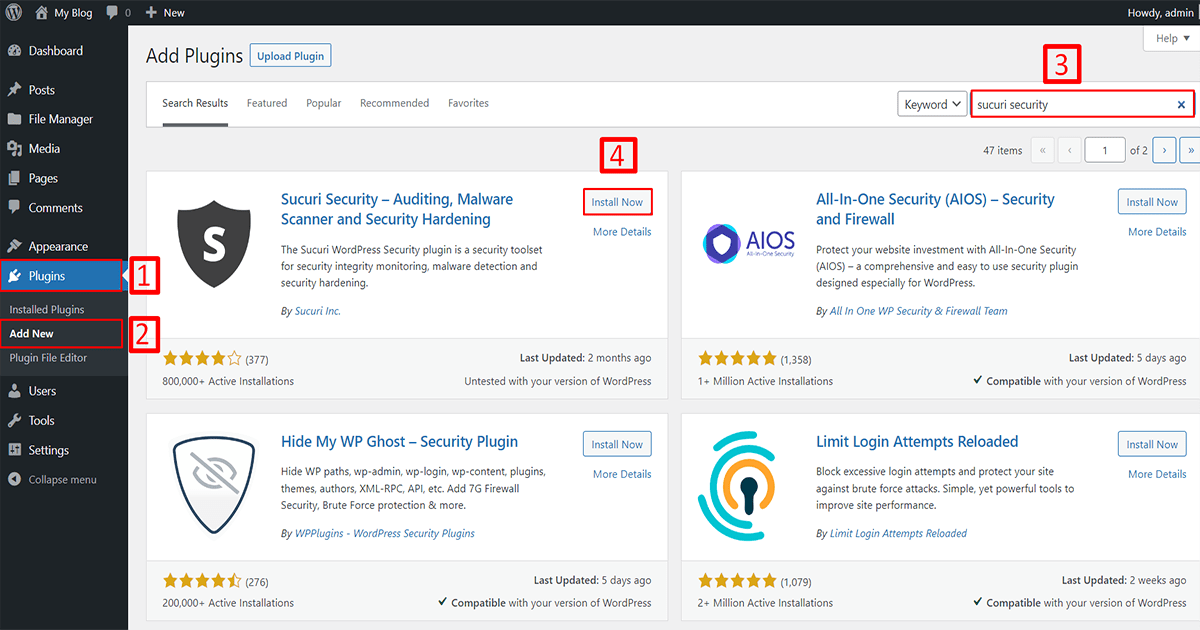
1. Go to Plugins
2. Click on Add New
3. Search for the “Sucuri security” plugin,
4. Click on the “Install Now” button and install it.
Then the installation process takes some time so wait a few moments. After that click to activate the plugin. Now the installation process is complete. You can see the plugin below.
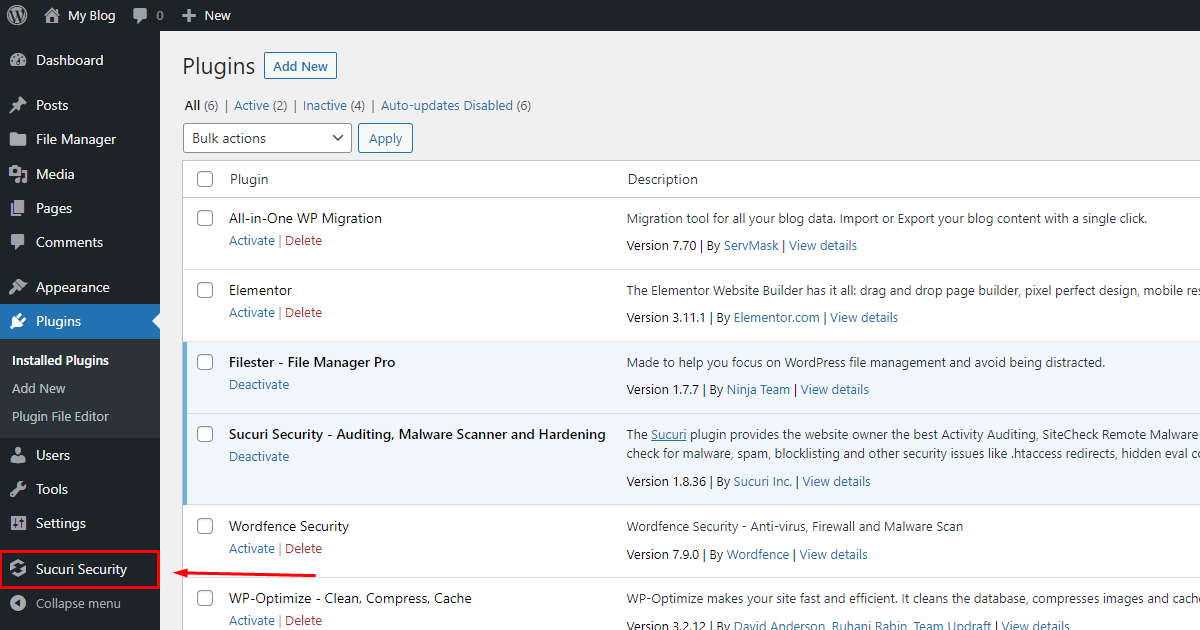
Now go to your sucuri security dashboard.
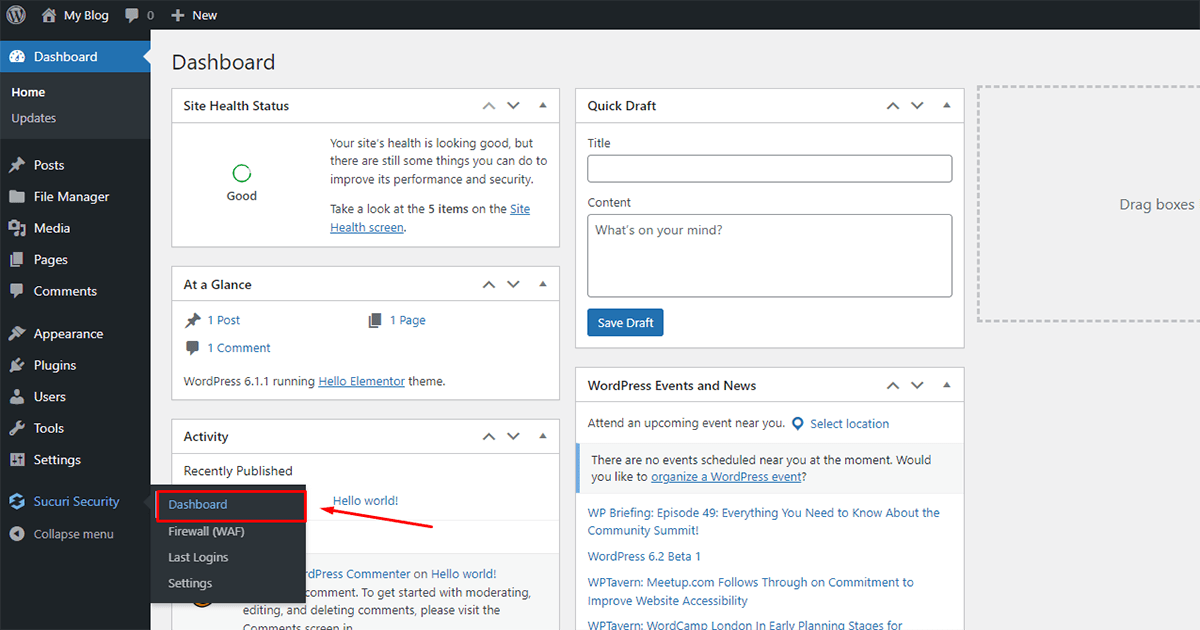
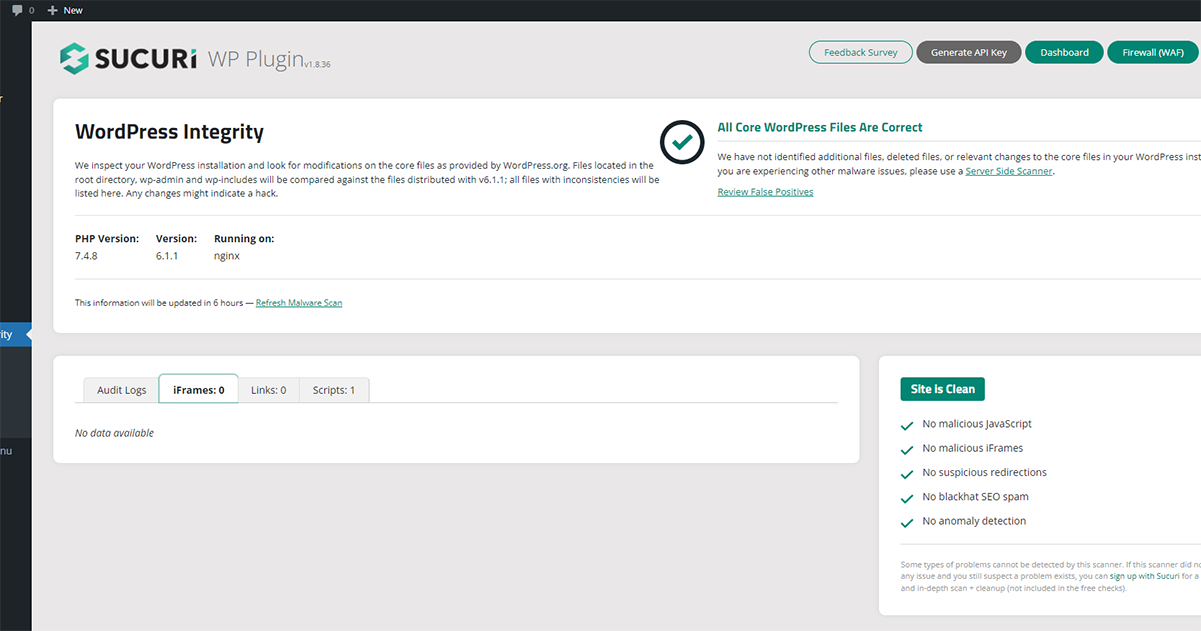
Your sucuri security plugin will automatically scan your website after entering the dashboard and find out if there is any malware on your website. This website has no malware so it looks clean
In addition to scanning for malware, you can increase your website protection with this plugin. How to increase? let’s learn how to increase security on your website:
First, Go to your WordPress dashboard and Follow the steps
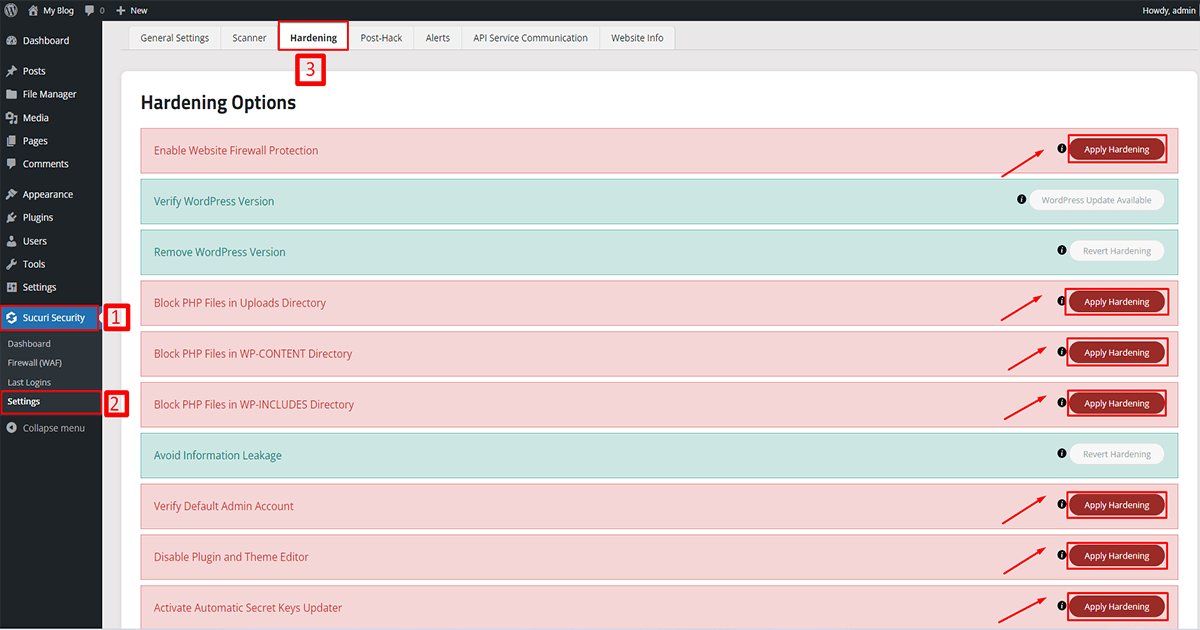
1. Go to Sucuri Security
2. Click on Settings
3. Click on the “Hardening” button.
After that, you can see the hardening options. You can apply the hardening as your wish.
In summary, Sucuri is one of the best security plugins company that provides website owners with a suite of security protection. Sucuri’s main features include website monitoring and scanning, malware detection and removal, firewall protection, and DDoS mitigation. it also offers website backup and restore services, security consulting, and training. It’s known for its fast response times to security incidents, with a dedicated team of security experts available 24/7 to help website owners in case of a security breach. The company also provides detailed reports and analytics to help the website owner understand and improve the security of her website.

NEED EXPERT HELP TO
Website Malware removal
If your website has been attacked by Malware, you may be experiencing a significant drop in traffic and revenue. Don’t panic! With our expert Malware removal services, we can help you get your site back up and running in no time.

How to Use Sucuri Security Plugin to Remove Malware from Your WordPress Website
How to install Free Sucuri Security Plugin and remove malware from your WordPress website
Sucuri is one of the most popular plugin used for malware scans of WordPress. It is a reputable security plugin that provides malware scanning, website firewall(WAF), Brute Force Attacks Protection, DDoS Attack Mitigation, IP Allowlisting, Bad Bot Blocking, and other security features. Both free and premium versions are offered. Now we have to learn how to scan malware in your website with sucuri plugin
Before scanning malware in your WordPress use the sucuri plugin. you need to install it. let’s learn how to install sucuri security plugin on your website:
First, Go to your WordPress dashboard and Follow the steps
The how to use sucuri wordpress plugin is available exclusively at Wp PiP.
1. Go to Plugins
2. Click on Add New
3. Search for the “Sucuri security” plugin,
4. Click on the “Install Now” button and install it.
Then the installation process takes some time so wait a few moments. After that click to activate the plugin. Now the installation process is complete. You can see the plugin below.

Now go to your sucuri security dashboard.

Your sucuri security plugin will automatically scan your website after entering the dashboard and find out if there is any malware on your website. This website has no malware so it looks clean

In addition to scanning for malware, you can increase your website protection with this plugin. How to increase? let’s learn how to increase security on your website:
First, Go to your WordPress dashboard and Follow the steps

1. Go to Sucuri Security
2. Click on Settings
3. Click on the “Hardening” button.
After that, you can see the hardening options. You can apply the hardening as your wish.
In summary, Sucuri is one of the best security plugins company that provides website owners with a suite of security protection. Sucuri’s main features include website monitoring and scanning, malware detection and removal, firewall protection, and DDoS mitigation. it also offers website backup and restore services, security consulting, and training. It’s known for its fast response times to security incidents, with a dedicated team of security experts available 24/7 to help website owners in case of a security breach. The company also provides detailed reports and analytics to help the website owner understand and improve the security of her website.

NEED EXPERT HELP TO
Website Malware removal
If your website has been attacked by Malware, you may be experiencing a significant drop in traffic and revenue. Don’t panic! With our expert Malware removal services, we can help you get your site back up and running in no time.

Understanding how to use the Sucuri WordPress plugin effectively is crucial for maintaining a secure online presence. Once installed, the Sucuri plugin offers an intuitive dashboard that allows you to monitor your site’s security status continuously. Regular malware scans are an essential part of this process, ensuring any threats are identified and neutralized swiftly.
To begin scanning your site, navigate to the Sucuri plugin and choose the ‘Scan’ option. This action will enable comprehensive checks, analyzing different parts of your website for vulnerabilities or malicious code. By knowing how to use the Sucuri WordPress plugin efficiently, you ensure that your site remains protected against common threats.
In addition to scanning, Sucuri also offers a range of proactive security measures like the firewall setup, which can be customized from the plugin settings. It’s beneficial to regularly review and update these settings to adapt to new online threats. Learning how to use the Sucuri WordPress plugin not only empowers you to manage security issues as they arise but also enhances your ability to prevent them from occurring in the first place.
