
Google Ads Disapproval: Fixing Malicious Software Issues
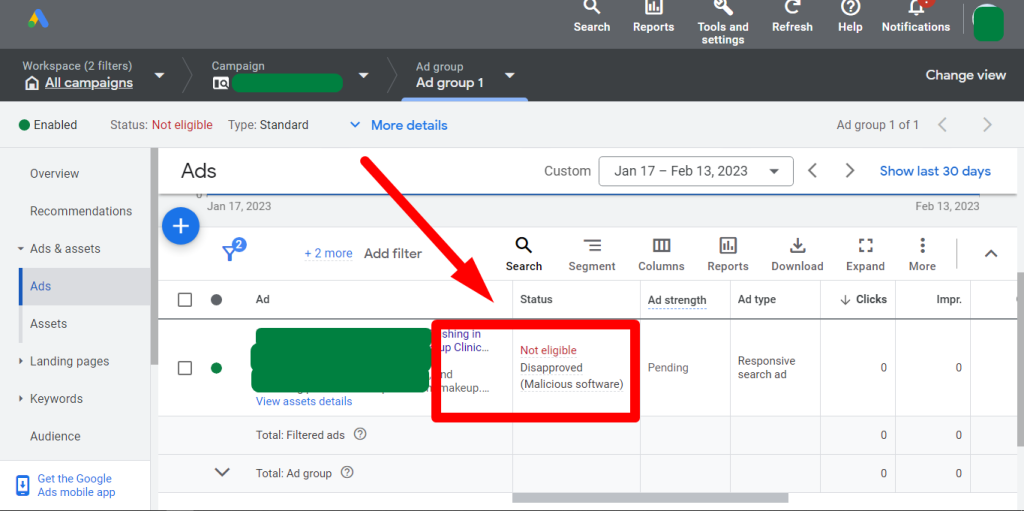
Google ads disapproved for malicious software fix. If your Google ad was disapproved for malicious software/ unwanted software, you are in the right place.
- your running Google ads are stopped for malicious software or malicious link?
- Google ads disapproved for malicious software / Google Adsense policy disapproved your website for malware?
- Showing any link that you don’t know or unwanted 18 ads?
- Redirects to another website?
- Google ads Account suspended for a malware issue?
- Showing unknown pages/ Japanese text on Google search?
- Or if: Hosting is suspended? Showing “account suspended contact your hosting provider” Bluehost, HostGator, Site Ground, Godaddy, NameCheap, Fozzy, or any other.
Any CMS: Shopify, WordPress, Magneto, Drupal, Wix, HubSpot, Joomla, Laravel, WooCommerce, PrestaShop, PHP, typo3, etc.
Don’t worry, we are here to help Google ads disapproved for malicious software issue!
You’ll get:
- Malware cleanup;
- Fix disapproved ads in Google Ads or Adsense;
- Fix your stopped ads for Malware issues/redirecting links.
- Security-related support.
- Vulnerability testing.
- Security patches and firewall installation.
- One-year guarantee on Advanced Package.
- Google ads disapproved for malicious software fix.
We clean malware or Japanese keywords/Chinese links from any website and help you to approve your google ads.
Money Back Guarantee.
Please message us for more information.
Why do Google ads disapproves ads for Malicious software?
Google Ads has a strict policy against advertising any content that could potentially harm users, including malicious software. If your ad has been disapproved due to a malicious software issue, it means that the ad or the website it links to may contain harmful software such as viruses, spyware, or malware.
Google takes the safety and security of its users very seriously, and they have put in place strict measures to prevent any potentially harmful content from being advertised. This helps to protect users from accidentally downloading or installing harmful software that could compromise their personal data and privacy.
If your Google ads disapproved for malicious software, we’ll review your ad and website to ensure that there is no malicious software present. This may involve running a malware scan on your website, removing any suspicious files, and ensuring that your website is up to date with the latest security patches and software updates.
Once we have resolved the issue, we’ll request a review from Google Ads to have your ad re-approved. However, it is important to take the necessary steps to ensure that your website remains free from any potentially harmful software to avoid future disapprovals.
Google Ads has a strict policy against advertising any content that could potentially harm users, including malicious software. If your ad has been disapproved due to a malicious software issue, it means that the ad or the website it links to may contain harmful software such as viruses, spyware, or malware. Google takes the safety and security of its users very seriously, and they have put in place strict measures to prevent any potentially harmful content from being advertised. This helps to protect users from accidentally downloading or installing harmful software that could compromise their personal data and privacy.
The good colors for classrooms is available exclusively at Wp PiP.
If your Google ads have been disapproved for malicious software, we’ll review your ad and website to ensure that there is no malicious software present. This may involve running a malware scan on your website, removing any suspicious files, and ensuring that your website is up to date with the latest security patches and software updates. Once we have resolved the issue, we’ll request a review from Google Ads to have your ad re-approved. However, it is important to take the necessary steps to ensure that your website remains free from any potentially harmful software to avoid future disapprovals.
Google Ads disapprovals due to malicious software can be a significant setback for businesses relying on online advertising. Malicious software, including viruses, spyware, or malware, poses a threat not only to the integrity of the ads but also to the safety of users who might interact with them. Google has implemented stringent policies to prevent such content from being advertised, ensuring a secure environment for its users. If your ad faces disapproval, it indicates that either the ad itself or the associated website has been flagged for potentially harmful content. This proactive measure by Google is crucial for maintaining user trust and safeguarding personal data and privacy.
To address this issue, it is essential to conduct a thorough review of both the ad and the website it links to. This process typically involves running comprehensive malware scans to detect and remove any suspicious files or code and ensuring that the website is updated with the latest security patches. By taking these steps, you not only resolve the immediate issue but also fortify your site against future threats. Once these measures are implemented, you can request a review from Google Ads, aiming to have your ad reinstated. Maintaining a secure and clean online presence is vital to avoid repeated disapprovals and to ensure continuous, safe engagement with your audience.

Ensuring your Google Ads remain active and free from disapproval due to malicious software issues is essential for maintaining a steady flow of traffic and potential conversions. If you’ve encountered problems with disapproval, it’s crucial to delve into understanding the root causes and implement corrective measures swiftly. Your ads may have been stopped due to the detection of malicious software or links associated with your site. Equipping yourself with the knowledge to address these issues efficiently will not only prevent future disapprovals but also enhance your overall digital advertising strategy.
One effective strategy to keep your site clean and compliant with Google Ads policies is to regularly scan your site for vulnerabilities. These might include outdated plugins, insecure coding practices, or even the presence of unauthorized scripts that could be flagged as harmful. Regular audits of your website’s security framework ensure that such malicious elements are swiftly detected and removed. Keeping your digital assets secure helps in preventing the disapproval of your Google ads for reasons linked to security breaches.
Understanding the appeal of creating a conducive environment, especially in educational settings such as classrooms, can also play a pivotal role in how you structure and market your offerings. Interestingly, research indicates that good colors for classrooms can significantly impact learning and attention spans of students. Calm, soothing colors like blue and green are often recommended for spaces where focus is required, while brighter colors such as yellow can stimulate creativity and enthusiasm. Highlighting the intersection between aesthetically pleasing designs and safety in your digital space not only helps in compliance but also enhances user experience and engagement.
Moreover, if you’re involved in promoting educational materials or interior design solutions through Google Ads, ensure your campaign assets and messaging resonate with the target audience. Reflective choices, such as showcasing good colors for classrooms, can enhance the effectiveness of your marketing content. These insights can serve as an added value in your offerings, showcasing an understanding of how environmental aesthetics influence productivity and concentration. Ensuring that your marketing materials are both visually appealing and psychologically impactful can contribute significantly to your ad performance.
Besides, maintaining good content hygiene on your site should also encompass alignment with Google’s advertising policies. Since the goal is to create a trusted platform for users, it’s vital to routinely update your content to reflect accurate, beneficial information. Integrating content that educates your audience on topics like the benefits of choosing good colors for classrooms not only enriches your site’s value but reinforces the perception of your brand as a knowledgeable authority in your field. This approach aids in building robust trust with your audience and aligns well with Google’s expectations.
In summary, addressing the disapproval of Google Ads due to malicious software involves both technical solutions and strategically coherent content. Secure your site, provide valuable insights that align with current trends like good colors for classrooms, and ensure that your ads and site content work synergistically to present a credible and authoritative platform. This will significantly mitigate the risk of disapprovals and enhance the overall effectiveness of your Google Ads campaigns.
If your Google ads were recently disapproved due to malicious software concerns, you’re probably feeling a mix of frustration and urgency. It’s vital to resolve these issues quickly to resume your ad campaigns. Understanding why your ads were flagged is the first step in fixing the problem. Sometimes, it’s not immediately apparent, especially if you’ve been vigilant with your website’s security. However, even small oversights can lead to disapprovals. Checking for outdated plugins, ensuring secure hosting, and running regular malware scans should be part of your routine to keep your site safe and your ads running smoothly.
While addressing these technical hurdles, it’s essential not to lose sight of the end goal: creating an appealing and effective message that connects with your audience. This naturally brings us to the topic of what makes for effective advertising content. In fields such as education, understanding design elements can significantly impact how your message is received. For instance, selecting good colors for classrooms can influence the learning environment, fostering creativity and focus. Similarly, the color palette of your ads must resonate with your intended audience and align with your brand’s message. Ensuring that your color choices don’t inadvertently clash with user expectations can help minimize the likelihood of future disapprovals.
While the technicalities of ad disapproval due to malicious software issues are complex, the overall goal is clearer communication and user engagement. Take this opportunity to review not just the technical aspects of your website but also the substance and style of your advertising content. Adding vibrant colors thoughtfully can transform classrooms into inviting spaces, making a similar approach beneficial in your advertising strategy. Good colors for classrooms aren’t just about aesthetics; they affect mood and behavior, which is critically important to effective learning—and potentially to your ad viewers’ responses.
As you work through these technical improvements, try to infuse the same dedication into understanding how design and color affect perception and interaction. Think of your ads as more than just a means to an end; they are part of a larger dialogue with your audience. Drawing inspiration from studies on good colors for classrooms might guide you in crafting more appealing visual content. As such, achieving the right harmony between form and function can make your ads more successful and reduce the likelihood of policy breaches in the future.
In conclusion, resolving Google ads disapprovals involves a dual approach: technical rectification and content enhancement. Learning from design principles, like choosing good colors for classrooms, can offer valuable insights on color psychology. These insights can be applied not just in educational settings but also across various domains, helping to enhance clarity, engagement, and ultimately, the success of your advertising strategies.
“`
Dealing with Google Ads disapproval due to malicious software can be a frustrating experience. However, understanding the root causes and addressing them appropriately ensures the return of your ads in no time. When Google marks an ad for issues like malicious software, it typically means that there might be harmful code detected within your site’s pages or advertising material. It’s crucial to audit your website thoroughly to identify and eliminate potential threats embedded within scripts or media. Start by using Google’s Safe Browsing tool to check your site status, or utilize other malware scanning services to pinpoint vulnerabilities.
Once you’ve cleared your website of any malicious software, it’s essential to follow Google’s guidelines closely while resubmitting your ads for review. Reviewing your website’s security settings, updating all plugins, and maintaining a secure hosting environment are proactive measures that can prevent future disapprovals. While focusing on technical fixes, don’t overlook the importance of creativity and visibility in your ad campaigns. An engaging ad aligned with Google’s policies not only gets approved but also reaches your desired audience effectively.
Another aspect to consider is the content-related guidelines Google enforces. This includes having a professional and user-friendly website design. The use of appealing design elements such as colors can impact how your audience interacts with your site. For example, good colors for classrooms often include calming blues or stimulating yellows, which can also be adapted into your ad design to create a tranquil and inviting digital environment. This approach helps build trust with your users and complements the security measures you’ve taken, contributing to an overall improved site experience.
Colors play an influential role not just in aesthetics but also in functionality and perception, particularly in educational settings. In classrooms, colors are used strategically to enhance focus, creativity, and energy levels among students. Similarly, incorporating good colors for classrooms into your design can make your site more engaging and accessible. Understanding the color psychology—such as cool greens for relaxation or vivid oranges for enthusiasm—can boost user interaction on your site, contributing positively to the ad’s performance.
The journey from fixing malicious software issues to optimizing your Google ads requires a blend of technical and creative strategies. Start by maintaining a meticulous security protocol on your site to prevent malicious code from compromising your content. Progress to embracing creative, audience-centric design solutions that reflect a professional and reliable front. This combination not only helps in complying with Google’s advertising standards but also in reaching and retaining your target audience effectively.
Furthermore, as you gear up to redesign your site layout or marketing materials, channel your creativity to incorporate colors akin to good colors for classrooms. These hues are purposefully chosen to create conducive learning environments, and they can translate well into user-friendly web designs. Such strategic use of color could prove beneficial in creating a welcoming digital atmosphere, potentially enhancing the conversion rates of your ads while maintaining compliance with Google’s policies.
Remember, effective ad campaigns blend security, creativity, and compliance seamlessly. Resol


1 review for Google ads disapproved for malicious software fix
