
Many times, after the malware has been removed from your website, the result can be still incorrect on some anti-malware or anti-virus sites. Because of the fact that several antivirus providers blacklisted your website after it was infected by malware, it is still seen as unsafe and your domain is still backlisted. But after removing the malware from your website, you can contact them and request them to rescan your website, they will review your website and after checking, they will remove that site from their database blacklist.


As a result, your website will be marked as non-malicious and your normal rank will be restored. Avast Antivirus is one of these antivirus companies.


In this tutorial, we will show how to remove the website blocklist from Avast antivirus.

Verify that the malware is removed

Before requesting removal from the blacklist, make sure that your website is free of any malware. You can use an online scanner like VirusTotal, malware, or themes security to check your website for any malware. or You can use a WordPress scanner plugin like sucuri,wordfence, or shield security to check your website for any malware. for example, Some results are given below.

VirusTotal online scan result.
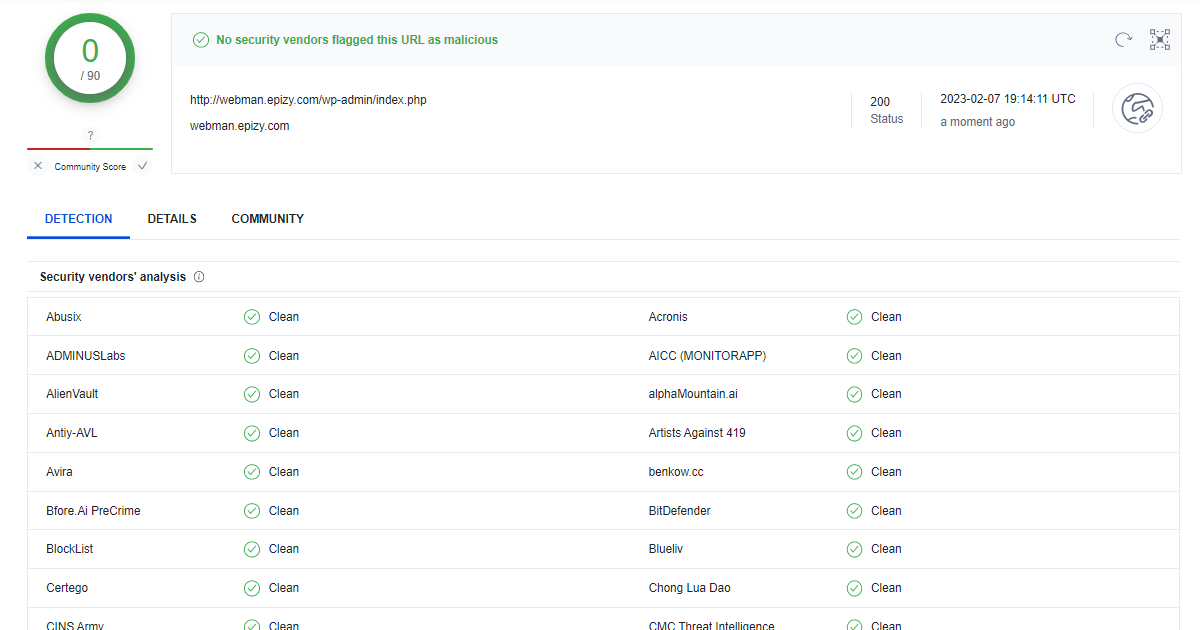
malware search result for WordPress malware protection

Shield Security plugin scan result. Here’s tutorial about How to Install and scan malware using Shield security Plugin.
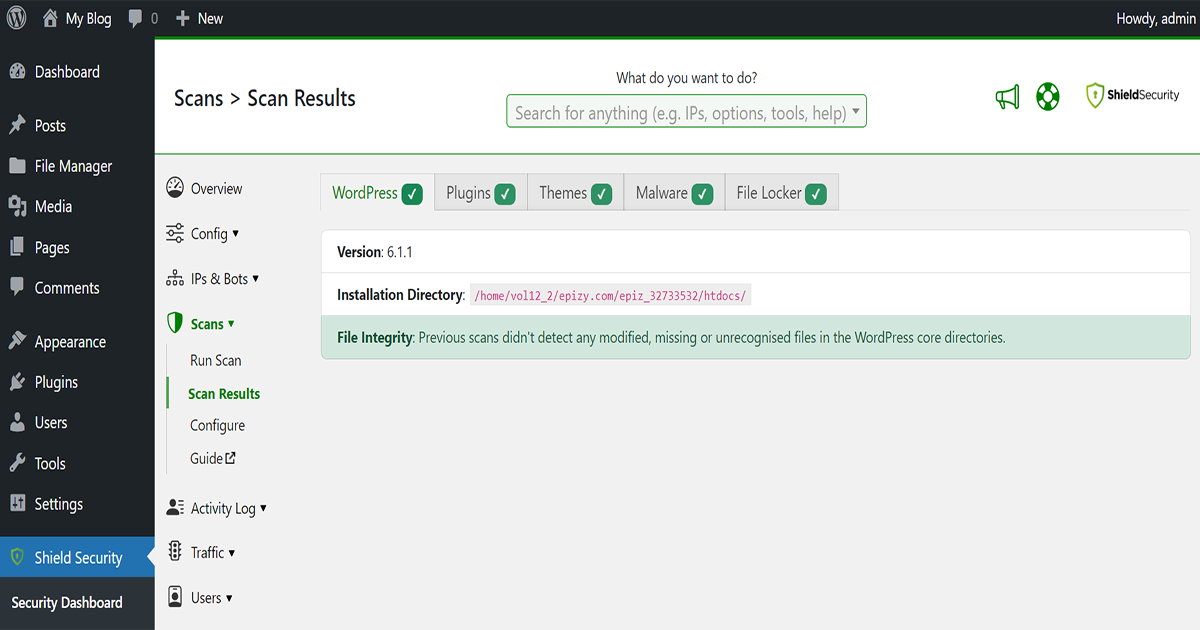
normal malware scan result on shield security plugin for WordPress malware removal

Request a review

Once you have confirmed that your website is malware-free, you can request a review from the Avast community. You can do this by visiting the Avast official website and filling out the online form for malware removal. How to request a review from the avast community let’s learn to follow the step

First, Go to your google search engine and search “Report a suspected false positive on avast” and enter. You can see the link below, click on the link.
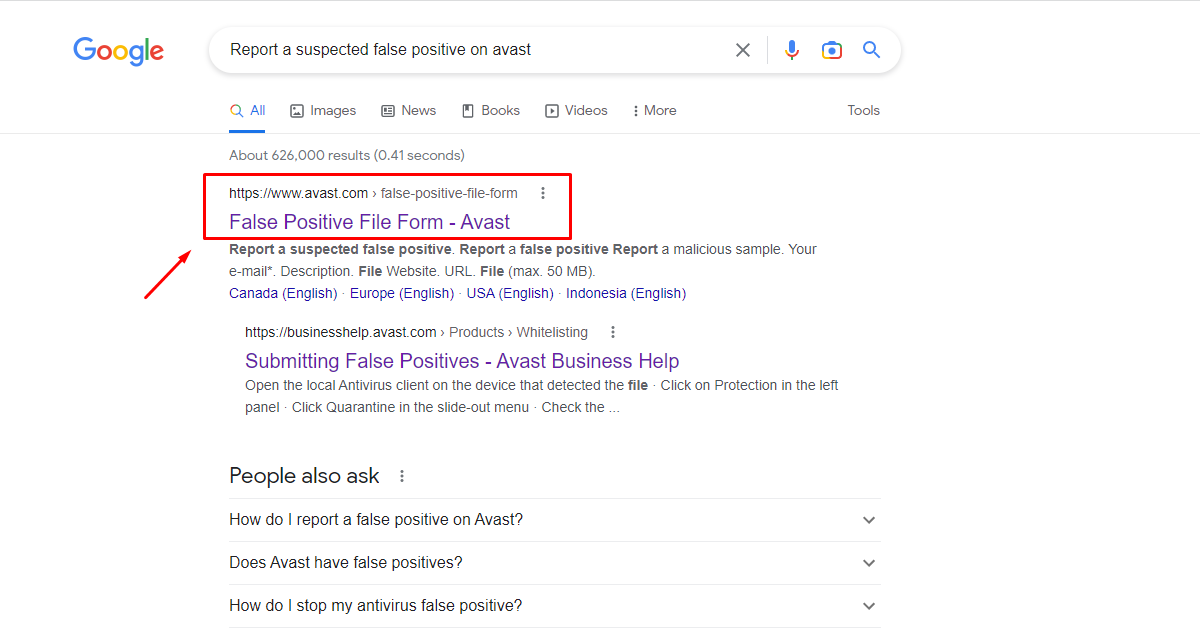
Google search results for submitting to the report on avast for WordPress malware removal

After entering the website you will see a form here. Fill out the form and complete the captcha after that click submits button to submit the form. Now “the Report a suspected false positive” report is successfully submitted and they will send you an automated email.
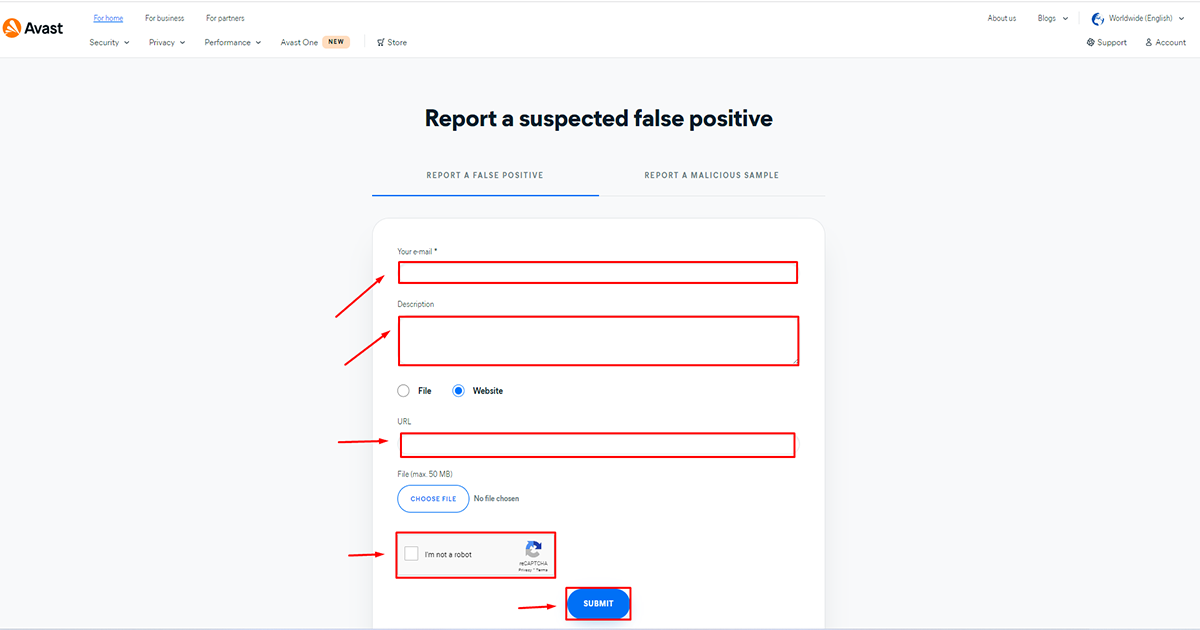

submit the form on avast for WordPress malware removal

Wait for the review

Avast will review your request and remove the blacklist if they confirm that your website is no longer infected. Usually, this task can take up to a few hours or a few days to complete. it’s depending on the company. After their review is successful you will receive an email that your site’s verification is complete.


Note: The process of removing the blacklist may take some time, and it's important to be patient and persistent in following up with Avast if needed.

Keep your website secure

To avoid future infections, make sure you keep your WordPress website up-to-date with the latest software, themes, and plugins. Also, regularly scan your website for malware using a security plugin like Wordfence or Sucuri. Click on this link to learn how to secure your website with Wordfence or Sucuri. Readme

How to remove the blacklist on Avast after removing malware from the WordPress website

Many times, after the malware has been removed from your website, the result can be still incorrect on some anti-malware or anti-virus sites. Because of the fact that several antivirus providers blacklisted your website after it was infected by malware, it is still seen as unsafe and your domain is still backlisted. But after removing the malware from your website, you can contact them and request them to rescan your website, they will review your website and after checking, they will remove that site from their database blacklist.As a result, your website will be marked as non-malicious and your normal rank will be restored. Avast Antivirus is one of these antivirus companies.In this tutorial, we will show how to remove the website blocklist from Avast antivirus.

Verify that the malware is removed

Before requesting removal from the blacklist, make sure that your website is free of any malware. You can use an online scanner like VirusTotal, malware, or themes security to check your website for any malware. or You can use a WordPress scanner plugin like sucuri,wordfence, or shield security to check your website for any malware. for example, Some results are given below.VirusTotal online scan result.malware search result for WordPress malware protectionShield Security plugin scan result. Here’s tutorial about How to Install and scan malware using Shield security Plugin.normal malware scan result on shield security plugin for WordPress malware removal

Request a review

Once you have confirmed that your website is malware-free, you can request a review from the Avast community. You can do this by visiting the Avast official website and filling out the online form for malware removal. How to request a review from the avast community let’s learn to follow the stepFirst, Go to your google search engine and search “Report a suspected false positive on avast” and enter. You can see the link below, click on the link.Google search results for submitting to the report on avast for WordPress malware removalAfter entering the website you will see a form here. Fill out the form and complete the captcha after that click submits button to submit the form. Now “the Report a suspected false positive” report is successfully submitted and they will send you an automated email.submit the form on avast for WordPress malware removal

Wait for the review

Avast will review your request and remove the blacklist if they confirm that your website is no longer infected. Usually, this task can take up to a few hours or a few days to complete. it’s depending on the company. After their review is successful you will receive an email that your site’s verification is complete.Note: The process of removing the blacklist may take some time, and it’s important to be patient and persistent in following up with Avast if needed.

Keep your website secure

To avoid future infections, make sure you keep your WordPress website up-to-date with the latest software, themes, and plugins. Also, regularly scan your website for malware using a security plugin like Wordfence or Sucuri. Click on this link to learn how to secure your website with Wordfence or Sucuri. Readme

Once you’ve successfully cleaned your WordPress website of malware, it’s understandable why you would expect antivirus tools like Avast to reflect this by removing any blacklists attached to your site. However, the re-indexing process and update to reflect a secure status can take some time. This delay can be frustrating, especially when potential visitors are deterred by the persistent warnings. To facilitate this, it’s essential to proactively reach out to Avast and notify them that your WordPress site is now safe.

To remove an Avast blacklist after WordPress malware cleanup, start by visiting Avast’s website where you can submit a request for a site review. When submitting your request, be clear and include all pertinent details about the actions taken to secure your site. Mention how you identified and resolved the malware issues and emphasize the steps taken to prevent future compromises. Following these detailed submissions will help expedite the review process and encourage a quicker update of your site’s status.

An important step to ensure your site stays off blacklists is to enhance overall security measures. Regularly update your WordPress plugins, themes, and core files to the latest versions to prevent vulnerabilities. Consider installing reputable security plugins specifically designed to monitor and guard against threats. Doing so not only protects your site but also aids in preventing future blacklisting incidents, ensuring that once you remove the Avast blacklist after WordPress cleanup, your site remains in the clear.

Remember that patience and vigilance are key. While it may feel tedious, following these steps systematically will strengthen the defense of your website and help you effectively remove Avast blacklist after WordPress security issues have been addressed. By maintaining open communication with antivirus providers and staying ahead of potential risks, you can ensure a safe and welcoming platform for all visitors.

WhatsApp Logo Chat with Us