
Table of Contents
ToggleHow to remove the blacklist on AVG Antivirus after removing malware from the WordPress website
Many times, after the malware has been removed from your website, the result can be still incorrect on some anti-malware or anti-virus sites. Because of the fact that several antivirus providers blacklisted your website after it was infected by malware, it is still seen as unsafe and your domain is still backlisted. But after removing the malware from your website, you can contact them and request them to rescan your website, they will review your website and after checking, they will remove that site from their database blacklist.
As a result, your website will be marked as non-malicious and your normal rank will be restored. AVG Antivirus is one of these antivirus companies.
In this tutorial, we will show how to remove the website blocklist from AVG antivirus.
Verify that the malware is removed
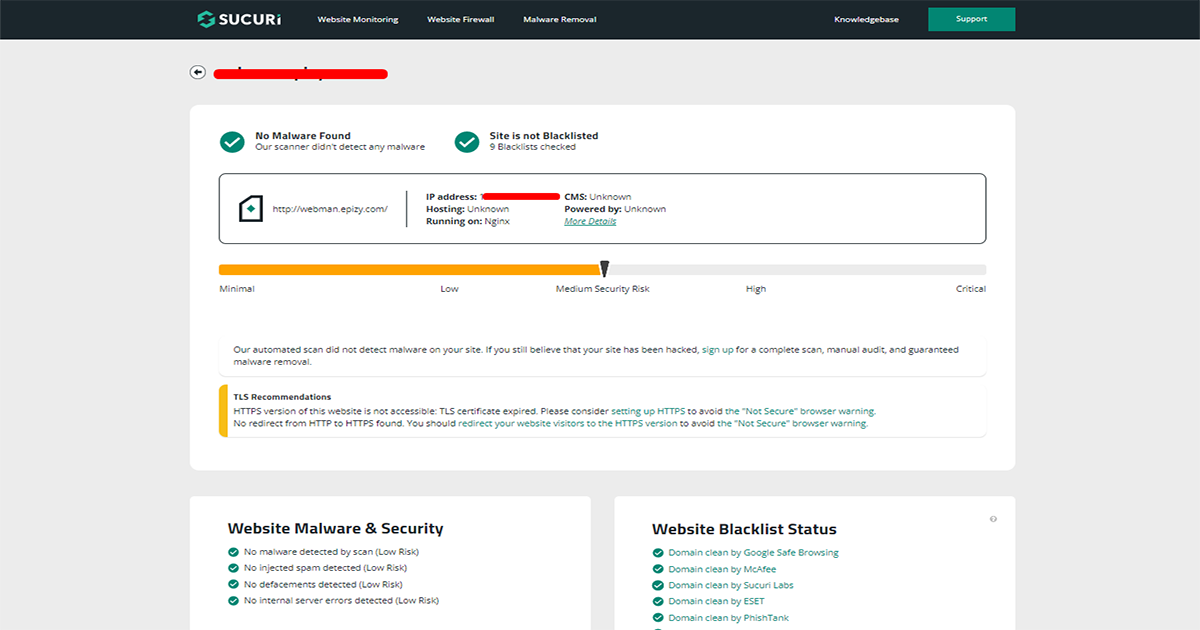
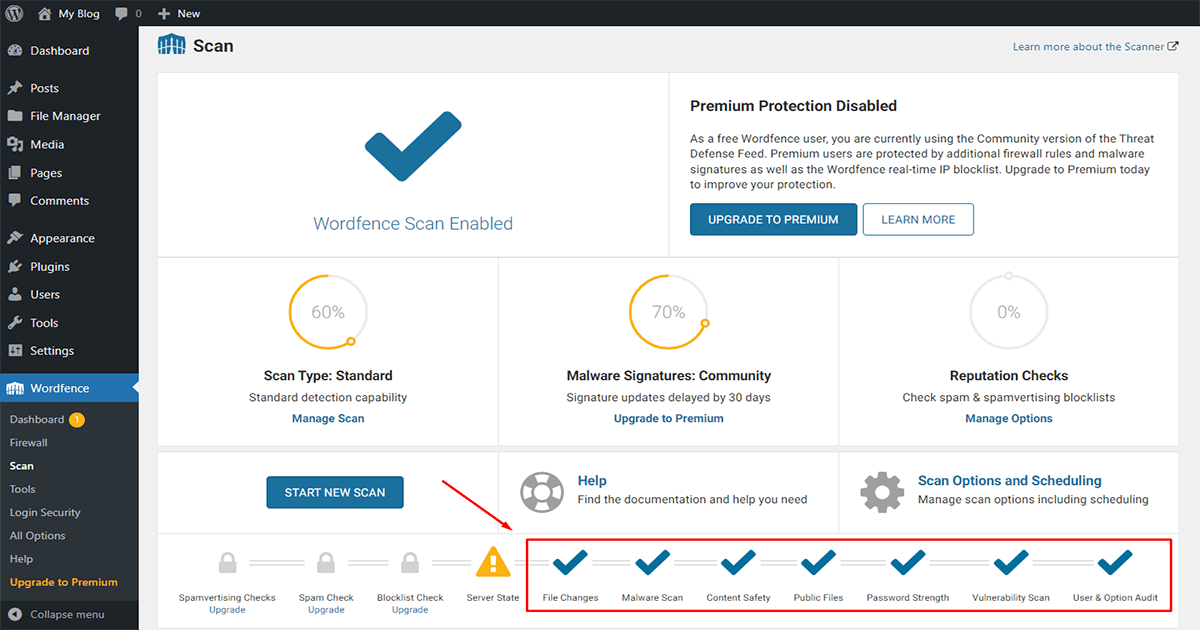
Before requesting removal from the blacklist, make sure that your website is free of any malware. You can use an online scanner like VirusTotal, Sucuri, or IThemes security to check your website for any malware. or You can use a WordPress scanner plugin like Sucuri, Wordfence, or shield security to check your website for any malware. for example, Some results are given below.
Sucuri online scan result.
Wordfence Security plugin scan result.
Request a review on AVG antivirus
Once you have confirmed that your website is malware-free, you can request a review from the AVG community. You can do this by visiting the AVG official website and filling out the online form for malware removal. How to request a review from the AVG community let’s learn to follow the step
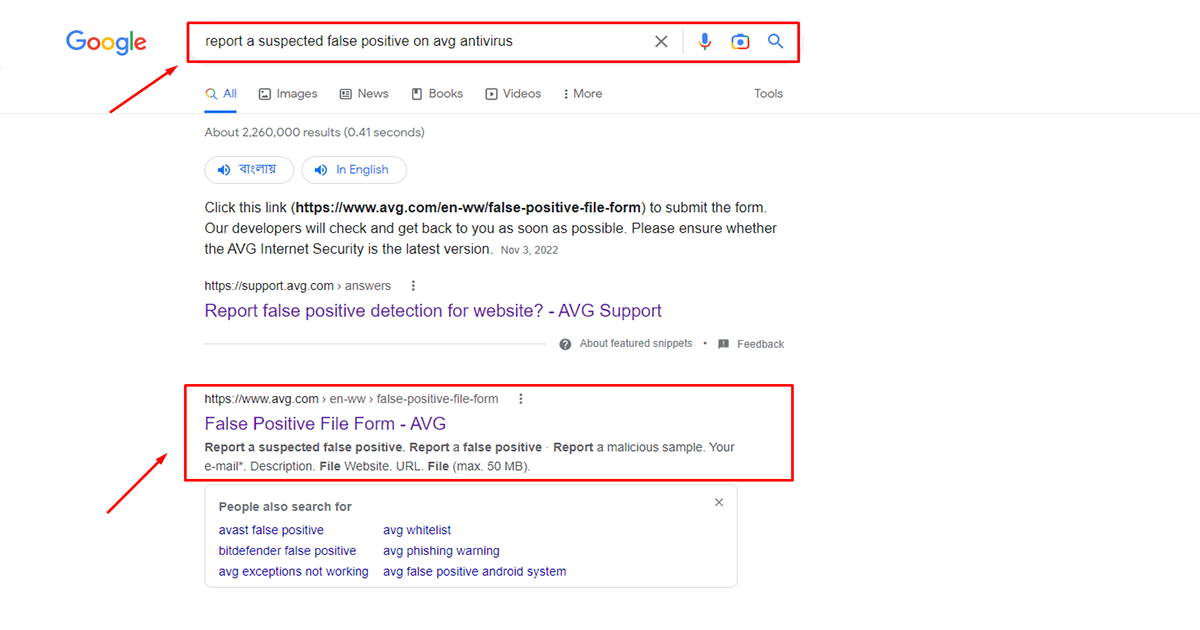
First, Go to your google search engine and search “Report a suspected false positive on AVG antivirus” and enter. You can see the link below, click on the link.
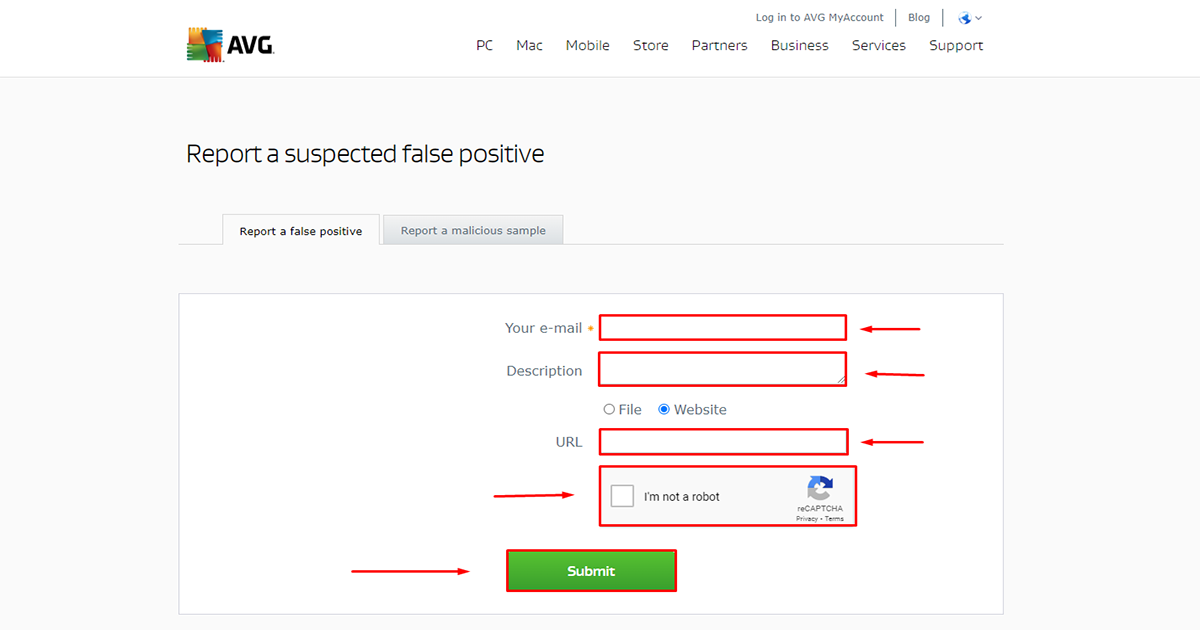
After entering the website you will see a form here. Fill out the form and complete the captcha after that click submits button to submit the form. Now “the Report a suspected false positive” report is successfully submitted and they will send you an automated email.

Wait for the review from AVG Antivirus team
AVG antivirus will review your request and remove the blacklist if they confirm that your website is no longer infected. Usually, this task can take up to a few hours or a few days to complete. it’s depending on the company. After their review is successful you will receive an email that your site’s verification is complete.
Note: The process of removing the blacklist may take some time, and it's important to be patient and persistent in following up with AVG company if needed.
Keep your website secure
To avoid future infections, make sure you keep your WordPress website up-to-date with the latest software, themes, and plugins. Also, regularly scan your website for malware using a security plugin like Wordfence or Sucuri. Click on this link to learn how to secure your website with Wordfence or Sucuri. Readme
Pro Tips: If you are not an expert in these tasks, take the help of an expert. Because a wrong move can be dangerous for your website or you can contact our team.Our team will handle your issue with care.
NEED EXPERT HELP TO
AVG antivirus Blacklist removal
If your website has been blacklisted by AVG antivirus, you may be experiencing a significant drop in traffic and revenue. Don’t panic! With our expert AVG blacklist removal services, we can help you get your site back up and running in no time.

How to remove the blacklist on AVG Antivirus after removing malware from the WordPress website
Many times, after the malware has been removed from your website, the result can be still incorrect on some anti-malware or anti-virus sites. Because of the fact that several antivirus providers blacklisted your website after it was infected by malware, it is still seen as unsafe and your domain is still backlisted. But after removing the malware from your website, you can contact them and request them to rescan your website, they will review your website and after checking, they will remove that site from their database blacklist. As a result, your website will be marked as non-malicious and your normal rank will be restored. AVG Antivirus is one of these antivirus companies. In this tutorial, we will show how to remove the website blocklist from AVG antivirus.Verify that the malware is removed
Before requesting removal from the blacklist, make sure that your website is free of any malware. You can use an online scanner like VirusTotal, Sucuri, or IThemes security to check your website for any malware. or You can use a WordPress scanner plugin like Sucuri, Wordfence, or shield security to check your website for any malware. for example, Some results are given below. Sucuri online scan result.
Wordfence Security plugin scan result.
Request a review on AVG antivirus
Once you have confirmed that your website is malware-free, you can request a review from the AVG community. You can do this by visiting the AVG official website and filling out the online form for malware removal. How to request a review from the AVG community let’s learn to follow the step First, Go to your google search engine and search “Report a suspected false positive on AVG antivirus” and enter. You can see the link below, click on the link.
After entering the website you will see a form here. Fill out the form and complete the captcha after that click submits button to submit the form. Now “the Report a suspected false positive” report is successfully submitted and they will send you an automated email.

Wait for the review from AVG Antivirus team
AVG antivirus will review your request and remove the blacklist if they confirm that your website is no longer infected. Usually, this task can take up to a few hours or a few days to complete. it’s depending on the company. After their review is successful you will receive an email that your site’s verification is complete.Note: The process of removing the blacklist may take some time, and it’s important to be patient and persistent in following up with AVG company if needed.Keep your website secure
To avoid future infections, make sure you keep your WordPress website up-to-date with the latest software, themes, and plugins. Also, regularly scan your website for malware using a security plugin like Wordfence or Sucuri. Click on this link to learn how to secure your website with Wordfence or Sucuri. ReadmePro Tips: If you are not an expert in these tasks, take the help of an expert. Because a wrong move can be dangerous for your website or you can contact our team.Our team will handle your issue with care.NEED EXPERT HELP TO
AVG antivirus Blacklist removal
If your website has been blacklisted by AVG antivirus, you may be experiencing a significant drop in traffic and revenue. Don’t panic! With our expert AVG blacklist removal services, we can help you get your site back up and running in no time.
After successfully eliminating malware from your WordPress website, it’s crucial to ensure that your site is not only safe but also recognized as safe by users and antivirus programs. One common challenge is addressing website blacklisting, particularly by well-known antivirus software like AVG. Although the immediate threat is gone, your website’s reputation needs to be restored to ensure smooth functioning and visitor trust. Taking steps to remove the blacklist by AVG after WordPress clean-up is an important part of this process. Remove blacklist avg after wordpress is a key part of what we offer here.
To effectively remove the blacklist AVG after WordPress malware removal, you need to inform AVG that your site is now secure. Begin by conducting a thorough scan to confirm there are no remaining threats. Utilize tools that check for malware signatures and vulnerabilities to give your website a clean bill of health. Once you are confident that your site is fully secure, visit the AVG website to request a reassessment of your URL. AVG offers a submission form for website owners to report incorrect URL categorizations and blacklist statuses.
Submit this form with all necessary details, including the actions taken to resolve the issue, to expeditiously remove the blacklist AVG after WordPress. Highlighting these details helps reassure the AVG team of your website’s renewed security and commitment to user safety. While you wait for a response, it’s a good idea to continue monitoring your website for any anomalies and maintain good security practices to prevent future attacks.
In addition to the technical process, communicate with your audience about the changes. Transparency about the steps taken can help rebuild trust with your users. This can include a blog post or an update note that outlines what occurred, how it was resolved, and the measures put in place to prevent similar future incidents. By making these efforts, you not only work to remove the blacklist AVG after WordPress complications but also strengthen your site’s reputation and reliability. Regular updates and good security habits can safeguard your site against the pitfalls of being blacklisted again, ensuring a seamless and safe user experience.
